| Welcome, Guest |
You have to register before you can post on our site.
|
| Forum Statistics |
» Members: 71
» Latest member: Martahar
» Forum threads: 47,413
» Forum posts: 47,419
Full Statistics
|
| Online Users |
There are currently 233 online users.
» 0 Member(s) | 221 Guest(s)
Ahrefs, Amazon, Bing, Claude, DataForSeo, DotBot, Google, OpenAI, Petalbot, Semrush, Seznam, Sogou
|
| Latest Threads |
Identifying and Sourcing ...
Forum: Parts , Attachments & Tools
Last Post: MikePhua
01-07-2026, 06:29 PM
» Replies: 0
» Views: 352
|
Cat 931B Brake Parts
Forum: Parts , Attachments & Tools
Last Post: MikePhua
01-07-2026, 06:29 PM
» Replies: 0
» Views: 250
|
Choosing Between Cat 228,...
Forum: General Discussion
Last Post: MikePhua
01-07-2026, 06:28 PM
» Replies: 0
» Views: 370
|
Fix It or Part It Out
Forum: General Discussion
Last Post: MikePhua
01-07-2026, 06:27 PM
» Replies: 0
» Views: 321
|
Hydraulic Delay When Lowe...
Forum: Troubleshooting & Diagnosing
Last Post: MikePhua
01-07-2026, 06:27 PM
» Replies: 0
» Views: 385
|
Bale Chopper and Mulcher ...
Forum: General Discussion
Last Post: MikePhua
01-07-2026, 06:26 PM
» Replies: 0
» Views: 275
|
Mini UC Maintenance
Forum: General Discussion
Last Post: MikePhua
01-07-2026, 06:25 PM
» Replies: 0
» Views: 264
|
Locating Wiring Informati...
Forum: General Discussion
Last Post: MikePhua
01-07-2026, 06:24 PM
» Replies: 0
» Views: 305
|
Case Industrial Brown Sub...
Forum: Parts , Attachments & Tools
Last Post: MikePhua
01-07-2026, 06:23 PM
» Replies: 0
» Views: 247
|
Dirt Work in West Virgini...
Forum: Construction & Urban Infrastructure Forum
Last Post: MikePhua
01-07-2026, 06:23 PM
» Replies: 0
» Views: 325
|
|
|
| Troubleshooting TCM Issues on the John Deere 310SJ Backhoe |
|
Posted by: MikePhua - 07-30-2025, 07:12 PM - Forum: Troubleshooting & Diagnosing
- No Replies
|
 |
Understanding the Role of the TCM
The Transmission Control Module (TCM) is the electronic brain behind the gear-shifting behavior of modern John Deere backhoes such as the 310SJ. It monitors inputs from sensors and switches, processes data in real time, and controls solenoids and hydraulic valves to ensure smooth, safe gear engagement.
In the 310SJ, the TCM plays a vital role in managing the PowerShift transmission—a fully hydraulic, electronically controlled gearbox that offers the ability to shift on the fly under load. With correct operation, the TCM allows operators to easily move between gears or direction changes (forward to reverse) with minimal delay or jerk.
However, when the TCM begins to fail or loses communication with other modules, it can result in erratic shifting, gear lockout, flashing transmission lights, or the machine refusing to move entirely.
Symptoms of a Failing or Disconnected TCM
Owners and technicians commonly report the following warning signs of a TCM-related issue in the 310SJ: - Flashing gear indicator or neutral light
- Machine stuck in neutral or fails to engage gear
- Hard or delayed shifting between forward and reverse
- Diagnostic trouble codes (DTCs) present on the monitor
- No movement despite engine running and parking brake off
TCM vs. ECU: Understanding the System Architecture
The 310SJ backhoe utilizes several electronic modules working together:- ECU (Engine Control Unit): Manages fuel injection, throttle, sensors, and emissions.
- TCM (Transmission Control Module): Controls shifting behavior, monitors speed sensors, and interacts with the FNR (Forward-Neutral-Reverse) lever.
- LCM (Load Control Module): Controls load-related features like ride control, boom lock, and more.
These systems are interconnected through a CAN Bus (Controller Area Network)—a high-speed communication network. If communication fails at any point in this chain, the TCM may enter a failsafe mode or become unresponsive.
Common Causes of TCM Malfunctions
The root causes behind TCM failure or communication loss typically fall into one of the following categories:- Voltage Problems
- A weak or inconsistent supply voltage can cause TCM shutdown. Loose battery terminals, weak alternator output, or bad grounds are prime suspects.
- Always check voltage at the TCM’s input pin. It should remain stable around 12.5–13.8 volts under load.
- Corroded or Damaged Connectors
- Moisture, vibration, and age can corrode connectors, especially around the TCM or under the cab.
- Pins may become loose or shorted due to pinched harnesses or rodent damage.
- Software Faults or Data Corruption
- A glitch in the firmware or memory corruption due to voltage spikes can cause the TCM to freeze or misinterpret signals.
- Some John Deere dealers offer reflash services to reinstall or update the TCM firmware.
- Failed Speed or Range Sensors
- The TCM relies on input speed sensors and range position sensors to determine what gear the transmission is in.
- A failed sensor may falsely indicate that the machine is not in neutral or that gear alignment is incorrect, causing the TCM to block engagement.
- TCM Itself is Damaged
- In rare cases, internal TCM failure due to heat, age, or voltage surge may require outright replacement.
Real-World Case: The Stubborn 310SJ That Refused to Shift
A contractor in Georgia reported a case where his 310SJ would intermittently flash the gear position light, refuse to move, and sometimes get “stuck” in a phantom gear. Despite replacing the FNR lever, the issue persisted.
After extensive troubleshooting, a mechanic discovered a broken wire in the harness running to the TCM connector, hidden under layers of electrical tape near the bellhousing. Once repaired and rewrapped properly, the machine returned to flawless operation.
This highlights a common reality in field service—electronic symptoms often stem from simple wiring issues, not failed modules.
How to Diagnose TCM Issues Effectively
A structured approach helps isolate and resolve TCM-related faults:
- Check for Fault Codes
- Use a John Deere diagnostic tool (like Service ADVISOR) to pull stored DTCs. Codes related to transmission control, sensor faults, or CAN communication are key clues.
- Inspect Voltage and Grounds
- Measure voltage directly at the TCM input. Check both power and ground pins.
- Verify alternator output and battery condition.
- Examine Wiring Harnesses and Connectors
- Remove, inspect, clean, and reseat TCM connectors.
- Look for chafing, corrosion, or rodent damage along the harness route.
- Test Speed and Range Sensors
- Backprobe sensors for correct voltage output or resistance values.
- Replace sensors that are out of spec.
- Check FNR Switch Input
- Ensure that the forward-neutral-reverse lever is signaling correctly to the TCM.
- The TCM won’t shift unless it receives a valid “neutral” confirmation from the FNR logic.
- Confirm CAN Communication
- Ensure the TCM is broadcasting and receiving on the CAN network.
- A failed ECU or termination resistor can disrupt traffic and isolate the TCM.
- Swap in Known-Good TCM (if possible)
- This is a last-resort test, especially if the original TCM shows no signs of life.
TCM Replacement Considerations
If the TCM is confirmed to be faulty and must be replaced:- Purchase only OEM or dealer-supported remanufactured TCMs.
- The TCM may need to be programmed or paired with the ECU via dealer software.
- Be cautious with used TCMs—part numbers and software versions must match your machine's configuration.
TCM in Harsh Operating Environments
Construction equipment electronics are subjected to severe environments: vibration, water, mud, and temperature extremes. John Deere typically mounts the TCM in relatively protected spots, but years of use and poor sealing can still cause damage.
In a documented case from Ontario, a 310SJ used for snow removal developed shifting issues in sub-zero temperatures. Condensation inside the TCM connector froze, creating an intermittent fault. After replacing the connector boot and sealing the harness with dielectric grease, the issue vanished.
Preventive Measures and Best Practices- Keep battery terminals and grounds clean and tight
- Use dielectric grease on sensitive connectors
- Avoid pressure-washing directly onto electronic modules
- Replace damaged harness insulation before corrosion begins
- Periodically scan for codes, even if no lights are showing
Glossary of Key Terms- TCM (Transmission Control Module): Controls automatic transmission shifting
- CAN Bus: High-speed communication network between electronic modules
- FNR Lever: The forward-neutral-reverse shift selector
- Input Speed Sensor: Measures transmission input shaft speed
- Range Selector Sensor: Indicates what gear the transmission is in
- Failsafe Mode: A restricted operating condition activated by module failure
Conclusion
The TCM in the John Deere 310SJ backhoe is an essential but often misunderstood component. While its failures can halt operation and mimic major mechanical faults, many issues stem from basic wiring, sensor feedback, or voltage inconsistencies. A methodical diagnostic strategy—supported by real-world experience and a solid understanding of the system—can turn a frustrating problem into a quick fix. As with much of modern equipment troubleshooting, success depends not just on the right tools, but the right mindset: think electrically, test systematically, and never assume the worst.
|

|
|
| Torque and Teeth: Comparing Wheel Loaders and Heavy Trucks |
|
Posted by: MikePhua - 07-30-2025, 07:11 PM - Forum: General Discussion
- No Replies
|
|
Introduction: Machines with Muscle, Built for Different Battles
Wheel loaders and heavy trucks are both titans of industrial work, yet they serve vastly different purposes. One is designed to dig, lift, and load; the other to haul, cruise, and deliver. While they may share visual similarities—large tires, diesel engines, and rugged frames—their internal mechanics, operational roles, and engineering philosophies diverge in fascinating ways. This article explores those differences, decoding the technical nuances and cultural contexts that shape each machine’s identity.
Key Terminology Explained - Torque: Rotational force produced by an engine, crucial for moving heavy loads.
- RPM (Revolutions Per Minute): A measure of engine speed; lower RPMs typically mean more torque in heavy equipment.
- Planetary Gear System: A gear configuration that distributes torque efficiently, often used in wheel loaders.
- Axle Tooth Count: Refers to the number of gear teeth in the axle’s differential; more teeth generally mean greater torque multiplication.
- Transmission: A system that transfers engine power to the wheels; varies significantly between loaders and trucks.
- Basin Gear: A colloquial term sometimes used to describe the ring gear in a differential.
Engine Characteristics: Torque vs. Speed- Wheel Loaders
Equipped with high-torque, low-RPM engines. These machines prioritize brute force over speed, allowing them to push, lift, and dig with precision and power.
- Heavy Trucks
Typically use engines tuned for lower torque at higher RPMs. Designed for sustained highway speeds and fuel efficiency, they excel in long-distance hauling rather than short bursts of power.
Axle and Gear Differences- Wheel Loaders
Feature axles with more gear teeth, especially in the ring gear, to multiply torque and withstand the stress of constant lifting and pushing. Planetary gear systems are common, distributing load across multiple gears for durability.
- Heavy Trucks
Use simpler axle configurations with fewer gear teeth, optimized for speed and fuel economy. While strong, they’re not built for the same repetitive stress as loaders.
Transmission Systems- Wheel Loaders
Often use powershift or hydrostatic transmissions, allowing smooth gear changes under load. These systems are built for frequent directional changes and variable terrain.
- Heavy Trucks
Employ manual or automated manual transmissions with synchronized gears, designed for consistent forward motion and long hauls.
Structural and Functional Contrasts- Wheel Loaders
- Articulated steering for tight turns
- Front-mounted bucket for scooping and lifting
- Operate in confined spaces like quarries and construction sites
- Designed for short-distance, high-intensity tasks
- Heavy Trucks
- Conventional steering with long wheelbases
- Flatbeds, dump bodies, or trailers for cargo transport
- Built for highways and long-distance hauling
- Prioritize speed, fuel efficiency, and payload capacity
Real-World Anecdotes and Use Cases
In a limestone quarry in Kentucky, a fleet of wheel loaders moves tons of crushed rock from the crusher to stockpiles. Their high torque and maneuverability allow them to operate efficiently in tight, uneven terrain. Meanwhile, heavy trucks wait at the edge of the site, ready to haul the material to distant processing plants. The loaders do the heavy lifting; the trucks do the long-distance running.
A Canadian logging company once attempted to use a highway truck to move logs within a muddy forest site. The result? The truck bogged down repeatedly, unable to generate the torque needed for off-road traction. They switched to a wheel loader with a grapple attachment, which handled the terrain with ease.
Historical Context: Diverging Evolution
Wheel loaders evolved from early tractor-loader hybrids in the 1950s, designed for earthmoving and material handling. Their development focused on hydraulic power, torque multiplication, and rugged articulation.
Heavy trucks, on the other hand, trace their lineage to military transport vehicles and commercial freight haulers. Their evolution emphasized speed, fuel economy, and standardized road dimensions.
Modern Innovations and Crossovers- Wheel Loaders
- GPS-enabled load tracking
- Auto-weighing buckets
- Hybrid drivetrains for fuel savings
- Joystick steering and ergonomic cabins
- Heavy Trucks
- Adaptive cruise control
- Automated transmissions
- Telematics for route optimization
- Electric and hydrogen-powered models emerging
Conclusion: Purpose Defines the Machine
Though wheel loaders and heavy trucks may share diesel engines and industrial aesthetics, their differences are profound. One is a short-range powerhouse, built to wrestle with earth and debris; the other a long-haul specialist, engineered for endurance and efficiency. Understanding these distinctions isn’t just academic—it’s essential for choosing the right tool for the job. Whether you're moving mountains or crossing them, the right machine makes all the difference.
|
|
|
|
| Finding a Good Deal on Tracks: What You Need to Know |
|
Posted by: MikePhua - 07-30-2025, 07:02 PM - Forum: General Discussion
- No Replies
|
|
When it comes to heavy equipment, particularly those utilizing tracked systems, maintenance of the tracks is one of the most crucial aspects to ensure optimal performance and longevity. Whether you're managing a fleet or working on your own machinery, finding quality tracks at a reasonable price can make a huge difference in reducing costs over time. This article covers the key factors involved in sourcing tracks for your machinery, the importance of track maintenance, and tips on how to find the best deals.
Key Terminology - Track System: A type of undercarriage used in heavy equipment, such as excavators, bulldozers, and skid steers, to provide better traction and stability, especially in rough or soft terrain.
- Rubber Tracks: Tracks made of durable rubber that are commonly used on compact equipment like mini excavators and skid steers.
- Steel Tracks: A more heavy-duty option, steel tracks are often used on larger machinery like bulldozers and excavators.
- Track Pads: The individual segments of the track that make contact with the ground. These can vary in design depending on the type of terrain the equipment is used in.
- Track Tensioning: The process of adjusting the tension of the tracks to ensure they neither sag nor stretch too tightly, which can cause excessive wear.
Types of Tracks
Understanding the different types of tracks available is crucial to making an informed purchase. Tracks are designed for various types of terrain and usage, so it’s essential to match the track type to the equipment's needs.
Rubber Tracks- Pros: Rubber tracks are quieter, lighter, and less damaging to delicate surfaces compared to steel tracks. They are ideal for compact equipment, such as mini excavators and skid steers, that operate on asphalt, paved roads, or soft ground.
- Cons: Rubber tracks wear out faster on rough, abrasive surfaces like rocky terrain.
Steel Tracks- Pros: Steel tracks are durable and built to withstand harsher conditions, such as rocky terrains, rough construction sites, and mining environments. They last longer than rubber tracks in abrasive conditions.
- Cons: Steel tracks are heavier, noisier, and can damage paved roads or sensitive surfaces.
How to Find Good Deals on Tracks
While finding a good deal on tracks might seem like a straightforward task, it requires knowledge and diligence. The price of tracks can vary significantly depending on the type, brand, and supplier. Below are some key steps to help you find a great deal on tracks:
1. Shop Around and Compare Prices
Different suppliers may offer the same tracks at different prices. It’s important to shop around and compare prices from various online marketplaces, local dealerships, and aftermarket suppliers. Be sure to factor in shipping costs, as these can add a significant amount to the total price, especially if you're ordering from a remote location.- Online Marketplaces: Websites like eBay, Amazon, or specialized heavy equipment sites often offer competitive pricing for rubber and steel tracks.
- Local Dealers: Sometimes, local suppliers can provide deals that are not available online, especially when they have stock clearance sales or seasonal discounts.
2. Consider Aftermarket Tracks
While OEM (Original Equipment Manufacturer) tracks are the gold standard for many operators, aftermarket tracks can provide an excellent value at a much lower price. Aftermarket tracks are designed to meet or exceed OEM standards, and many manufacturers offer warranties to back up their products.- Benefits: They are often less expensive, readily available, and come with a variety of options in terms of tread design and material.
- Drawbacks: In some cases, the quality of aftermarket tracks may not match OEM tracks, but this largely depends on the brand and supplier.
3. Bulk Purchase Discounts
If you manage a fleet of machines or are planning a large-scale project, purchasing tracks in bulk can provide significant savings. Many suppliers offer bulk discounts or deals for contractors who need multiple sets of tracks.- Negotiation: Don't hesitate to negotiate the price, especially if you are purchasing multiple sets. Suppliers may be willing to offer better pricing for large orders.
- Long-Term Partnerships: Establishing a relationship with a supplier could help you secure future discounts and favorable terms.
4. Track Rebuilding or Retreading Services
If your current tracks are worn out but still have a lot of life left in them, consider rebuilding or retreading services. Some companies specialize in refurbishing old tracks, adding new rubber or steel to extend their life.- Pros: This can be an affordable alternative to purchasing completely new tracks. It’s especially beneficial for machinery that uses steel tracks.
- Cons: Not all tracks can be rebuilt, and it’s important to ensure the tracks are still structurally sound before opting for this solution.
Track Maintenance Tips
Maintaining your tracks is essential for maximizing their lifespan and ensuring that your machine runs smoothly. Regular maintenance can help prevent costly repairs and downtime.
1. Check Track Tension Regularly
Tracks that are either too tight or too loose will wear unevenly and can cause unnecessary stress on the machine’s undercarriage. Regularly check the tension to ensure it falls within the recommended range for your specific equipment.- Too Tight: Over-tightened tracks can lead to premature wear and damage to the sprockets and rollers.
- Too Loose: Loose tracks can slip off the sprockets and cause damage to the undercarriage.
2. Inspect Tracks for Damage
Visually inspect your tracks regularly for signs of damage, such as cuts, cracks, or missing teeth on the track pads. Early detection of damage allows for quicker repairs, which can help prevent further issues.- Track Pads: Check for any broken or worn-out track pads. Replacing individual pads can be more cost-effective than replacing the entire track.
- Sprockets and Rollers: Examine sprockets and rollers for wear. If you notice excessive wear, it might be time to replace these components to prevent further damage to the tracks.
3. Clean Tracks After Use
Cleaning your tracks after use, especially if you're operating in muddy or wet conditions, can prevent dirt and debris from accumulating and causing additional wear. Regular cleaning also helps to prevent rust on steel tracks.- High-Pressure Wash: Use a high-pressure wash to clean the tracks thoroughly, removing dirt, mud, and sand from the rollers, sprockets, and links.
- Inspect for Obstructions: Check for rocks or debris that may have become lodged in the track assembly and remove them carefully.
4. Monitor Operating Conditions
Pay attention to the operating environment, as extreme conditions can accelerate wear on tracks. For example, if you're working in rocky or abrasive environments, steel tracks may be a better option than rubber tracks.- Terrain Considerations: Make sure you are using the right track material for the conditions you are operating in. For instance, rubber tracks are ideal for soft terrain like sand and mud, while steel tracks are more suitable for hard, rocky surfaces.
Conclusion
Finding good deals on tracks for heavy equipment, such as the John Deere 450G or Bobcat S150, involves research, negotiation, and an understanding of the different options available. By exploring both OEM and aftermarket options, considering bulk discounts, and maintaining your tracks regularly, you can extend their lifespan and reduce overall costs. Remember, choosing the right track for your equipment's needs and maintaining it properly is key to ensuring efficient and cost-effective performance.
|
|
|
|
| Wrestling with Iron: The Unexpected Bond Between Heavy Equipment and Mat Combat |
|
Posted by: MikePhua - 07-30-2025, 07:02 PM - Forum: General Discussion
- No Replies
|
|
Introduction: Where Grit Meets Grit
At first glance, wrestling and heavy equipment operation seem worlds apart—one is a sport of physical finesse and mental endurance, the other a trade of mechanical precision and brute force. Yet beneath the surface, both disciplines share a common language: control, timing, and the relentless pursuit of mastery. This article explores the surprising intersections between these two worlds, drawing on real-life stories, terminology, and the cultural overlap that binds them.
Key Terminology Explained - Folkstyle Wrestling: A style of wrestling practiced primarily in American high schools and colleges, emphasizing control and pinning.
- Freestyle Wrestling: An international style allowing more dynamic throws and leg attacks, used in Olympic competition.
- Heavy Equipment Operator (HEO): A skilled tradesperson trained to operate machinery such as excavators, bulldozers, and loaders.
- Track Hoe: A colloquial term for a tracked excavator.
- Loader: A machine used to scoop and transport materials like soil, gravel, or debris.
The Wrestler Behind the Wheel
One compelling example is Garett Tettemer, a high school wrestler who also trains as a heavy equipment operator. Tettemer, a state medalist in the 172-pound class, balances his time between wrestling mats and machinery yards. His story illustrates how the discipline of wrestling—mental toughness, physical conditioning, and strategic thinking—translates seamlessly into the world of heavy equipment.
He credits his father and uncle for introducing him to machinery, recalling childhood memories of sitting on loaders and watching track hoes in action. Wrestling taught him to respect timing and leverage, skills that now serve him well when maneuvering multi-ton machines with surgical precision.
Shared Skills and Mindsets- Balance and Coordination
Wrestlers learn to control their center of gravity, a skill mirrored in operating unstable or uneven terrain with heavy equipment.
- Mental Focus
Both fields demand intense concentration. A lapse in attention can mean a lost match—or a costly accident.
- Physical Conditioning
Wrestling builds core strength and endurance, which helps operators manage long hours in demanding environments.
- Problem Solving
Wrestlers adapt to opponents in real time; operators troubleshoot mechanical issues and terrain challenges on the fly.
Cultural Crossovers and Anecdotes
In rural communities, it's not uncommon to find young athletes who wrestle in winter and run tractors in summer. One Pennsylvania farmhand described how wrestling practice helped him develop the stamina needed for hay baling season. “You’re lifting, twisting, and moving all day—just like on the mat,” he said.
Another story comes from a vocational school where students in the heavy equipment program formed a wrestling club. Their coach noted that the students who excelled in both fields were often the most disciplined and mechanically curious.
Historical Parallels
The connection between physical labor and combat sports dates back centuries. Roman gladiators trained with weighted tools to simulate battlefield conditions. In the early 20th century, American farm boys often wrestled in barns and fields, developing strength that later translated into mechanical trades.
During World War II, military engineers were often recruited from wrestling teams due to their physical resilience and tactical thinking. Wrestling was seen as a proving ground for leadership and grit—qualities essential for operating bulldozers under fire or repairing tanks in hostile terrain.
Modern Reflections and Career Pathways
Today, vocational schools increasingly recognize the value of athletic discipline in technical training. Programs that combine sports and trades report higher retention and performance rates. Students like Tettemer exemplify this hybrid path—pursuing excellence in both arenas and preparing for careers that demand both brawn and brains.
Some schools even offer dual certifications, allowing students to graduate with credentials in heavy equipment operation and athletic achievement. Employers note that former wrestlers often make exceptional operators due to their work ethic and ability to stay calm under pressure.
Conclusion: Strength in Duality
The bond between wrestling and heavy equipment operation is more than metaphor—it’s a shared ethos of control, resilience, and respect for the forces at play. Whether gripping an opponent or a joystick, the goal is the same: to master movement, overcome resistance, and emerge stronger. In this unlikely pairing, we find a reminder that grit knows no boundaries—and that sometimes, the best operators are forged not just in workshops, but on wrestling mats.
|
|
|
|
| Understanding Oil Pressure Warning Lamps on John Deere Loader Backhoes |
|
Posted by: MikePhua - 07-30-2025, 07:01 PM - Forum: Troubleshooting & Diagnosing
- No Replies
|
|
Overview of the Issue
One of the most common and nerve-wracking concerns for owners and operators of John Deere loader backhoes is the appearance of the oil pressure warning lamp—especially when it illuminates intermittently or at low idle. The lamp is a critical indicator meant to alert operators to dangerously low engine oil pressure, but when it flickers or glows dimly at idle, confusion and anxiety often follow.
This article explores what this warning lamp really means, what causes the activity, and how to properly respond. We'll delve into system behavior, mechanical principles, component function, diagnostic paths, and even some real-world examples.
Understanding Oil Pressure and Its Indicators
Oil Pressure is the force exerted by oil as it is pumped through the engine’s internal passages to lubricate bearings, camshafts, pistons, and other moving parts. Maintaining correct pressure is vital to prevent metal-on-metal contact and catastrophic engine failure.
The Oil Pressure Warning Lamp (or indicator light) is an electrical device that monitors pressure via an oil pressure sender or switch. In most John Deere loader backhoes, especially older models like the 310C/D/E and 410 series, this system is relatively simple: - A pressure switch located near the oil filter senses if oil pressure is below a set threshold (typically around 7-10 psi).
- When the pressure is too low, the switch closes, completing a circuit that lights the warning lamp.
- Some models use a variable-pressure sender tied to an electronic control module (ECM) that interprets pressure more dynamically.
Normal and Abnormal Lamp Behavior
Operators often notice the lamp flickering or dimly glowing at hot idle. This usually occurs when the machine is fully warmed up, at low engine speeds, and after prolonged operation. This behavior may not always indicate imminent engine failure.
Consider the following conditions:- At low idle (around 800–900 RPM), oil pump output decreases.
- If oil is old, thinned, or contaminated, pressure drops more quickly when hot.
- Engines with high hours or bearing wear naturally have increased internal clearances, reducing oil pressure.
- A flickering lamp at idle may be typical for a worn but serviceable engine, especially if it immediately extinguishes upon throttle-up.
However, a lamp that stays on constantly, is bright at all RPMs, or is accompanied by noise, such as ticking or knocking, signals a more serious issue requiring immediate shutdown and diagnosis.
Misdiagnosis and Common Myths
There is a widespread tendency to overreact to the oil lamp without verifying pressure with a mechanical gauge. Stories abound of engines being unnecessarily torn down, or expensive oil pumps replaced, only to find the issue was a faulty switch, corroded wire, or poor ground.
A 2014 case in Ohio saw a municipal fleet retire a John Deere 410E prematurely due to persistent oil lamp warnings. A later inspection showed the switch was defective, and actual oil pressure was well within spec.
Diagnostics and Best Practices
To distinguish between false alarms and real danger, a logical diagnostic approach is essential. Follow this sequence:
- Install a Mechanical Oil Pressure Gauge
- Use a test port near the oil filter housing.
- Take readings at cold start, warm idle, and full throttle.
- Minimum acceptable warm idle pressure for most John Deere diesel engines is around 15–20 psi.
- Inspect the Oil Pressure Switch/Sender
- Replace if readings with the mechanical gauge are fine but the lamp still behaves erratically.
- Use OEM parts where possible—cheap aftermarket sensors often have incorrect calibration.
- Check the Electrical System
- Look for chafed wires, poor connections, or corroded terminals.
- A weak ground can cause the lamp to glow dimly even with proper pressure.
- Evaluate the Oil and Filter
- Use the correct viscosity (e.g., 15W-40 or as specified).
- Avoid extended oil change intervals.
- Beware of cheap filters that may bypass prematurely or restrict flow.
- Assess Engine Wear
- If pressure is low even at higher RPMs, and the gauge confirms it, internal wear may be the cause.
- Main bearings, camshaft journals, or oil pump gears may need inspection.
Technical Notes and Terminology- Bypass Valve: Prevents oil starvation by allowing unfiltered oil to flow if the filter is clogged.
- Relief Valve: Regulates maximum pressure in the oiling system to prevent over-pressurization.
- Viscosity Index: A measure of how much a fluid’s viscosity changes with temperature. Low-VI oils thin quickly under heat, worsening pressure issues.
Historical Case: John Deere 310D Fleet in California
In a rural California county, a public works department ran a dozen John Deere 310D backhoes for over a decade. Several units developed flickering oil lamps past the 8,000-hour mark. Rather than panic, the fleet mechanic installed gauges and found pressures at idle had dropped to 12–15 psi, but at full throttle, remained over 40 psi. They switched to a high-detergent 15W-40 synthetic blend, replaced sensors, and cleaned ground terminals. All units continued to run without failure for another 2,000+ hours.
This case underscores the importance of understanding rather than reacting.
Lessons from Aviation and Race Engines
Aircraft mechanics and motorsports technicians often emphasize one thing: “Trust the gauge, not the light.” This wisdom applies just as well to loader backhoes. Lights are binary; gauges give context. High-performance engines, whether in the sky or on the track, rely on accurate pressure readings under all loads and temperatures. The same should be true in heavy equipment maintenance philosophy.
Upgrades and Modifications
Some owners choose to retrofit a real oil pressure gauge into the dash of their older machines. This modification provides peace of mind and allows real-time monitoring, especially in environments with high ambient temperatures or sustained load.
When to Worry- Lamp stays on after startup at any RPM
- Pressure drops below 10 psi at idle (confirmed by gauge)
- Lamp comes on under load, not just at idle
- Unusual engine noises (knocking, ticking) accompany the lamp
- Oil is milky (coolant contamination) or metallic (bearing damage)
When It’s Likely Normal- Lamp flickers only at hot idle
- Pressure recovers immediately with throttle
- Oil and filter are fresh, correct grade
- No noises or performance drop
- Machine has high hours but is otherwise healthy
Final Thoughts
The oil pressure warning lamp on a John Deere loader backhoe is not an oracle of doom—it’s a starting point for investigation. In most cases, intermittent lamp activity at idle points to aging components or minor electrical faults, not imminent failure. By combining mechanical insight, proper diagnostics, and preventive maintenance, operators and technicians can extend engine life, avoid unnecessary repairs, and make informed decisions.
Real-world experience and common-sense troubleshooting often matter more than a glowing light on the dash.
|
|
|
|
| Understanding and Troubleshooting the John Deere 450G: A Comprehensive Guide |
|
Posted by: MikePhua - 07-30-2025, 07:00 PM - Forum: Troubleshooting & Diagnosing
- No Replies
|
|
The John Deere 450G is a popular crawler loader, known for its durability and versatility on construction sites, landscaping, and other heavy-duty operations. Over the years, these machines have gained a reputation for their strong performance and reliability. However, like all heavy equipment, issues can arise that affect their functionality. This guide provides an in-depth look at common problems, troubleshooting techniques, and maintenance tips for the John Deere 450G.
Key Terminology - Crawler Loader: A type of heavy equipment that uses tracks instead of wheels to provide better traction and stability, especially on rough terrain.
- Hydrostatic Transmission: A type of transmission that uses fluid to transmit power, offering smooth operation and efficient torque control.
- Track Tensioning: The process of adjusting the tension of the tracks to ensure they are neither too tight nor too loose, which can affect the machine's performance.
- Hydraulic System: A crucial system in construction equipment, providing the force needed to operate the loader's arms, bucket, and other components.
Common Issues with the John Deere 450G
Despite its reliability, the John Deere 450G can encounter a variety of issues, some of which are common in older machines or those with heavy usage. Below are some typical problems and their potential causes.
1. Engine Performance Issues
One of the most common problems with the 450G is related to engine performance. Symptoms such as a loss of power, stalling, or difficulty starting are often linked to the following causes:- Fuel system issues: Blocked fuel filters, clogged fuel injectors, or problems with the fuel pump can restrict fuel flow, leading to engine performance issues.
- Air filter problems: A dirty or clogged air filter can cause the engine to struggle with proper combustion, leading to reduced power output.
- Faulty sensors: Modern engines rely on sensors to adjust fuel and air mixture. A malfunctioning sensor can cause erratic engine performance.
2. Transmission Problems
Transmission issues can occur due to wear, lack of maintenance, or fluid contamination. Common symptoms include slipping gears, erratic shifting, or failure to move.- Hydrostatic transmission fluid levels: Low fluid levels can affect the smooth operation of the transmission. Regular checks and proper fluid maintenance are essential for preventing issues.
- Clogged filters: Transmission filters are responsible for preventing dirt and debris from entering the system. Over time, they can become clogged, leading to restricted fluid flow and poor transmission performance.
- Worn-out seals or valves: Leaks in seals or faulty valves can cause pressure loss in the transmission system, leading to a decrease in performance.
3. Hydraulic System Failures
The hydraulic system is a critical component of the John Deere 450G, responsible for powering the loader’s arms, bucket, and other attachments. Hydraulic system failures can manifest as slow response times, inability to lift loads, or unresponsive controls.- Low hydraulic fluid levels: One of the most common causes of hydraulic failure is a low fluid level. Always check the fluid levels before operation.
- Leaks: Leaking hydraulic hoses or seals can lead to a significant loss of pressure, reducing the system's performance.
- Damaged pump or valves: A damaged hydraulic pump or malfunctioning valves can cause a complete failure of the hydraulic system.
4. Track and Undercarriage Wear
The undercarriage and tracks of the 450G are subject to significant wear, especially in rough terrain. Track tension issues, damaged rollers, or worn-out tracks can lead to poor performance, increased fuel consumption, and unnecessary repairs.- Track tension: Improper track tension can lead to excessive wear or cause the track to slip off the sprocket. Regular tensioning is necessary to maintain proper performance.
- Roller and idler wear: Worn rollers or idlers can cause the tracks to sag or move erratically, leading to uneven wear and potential track failure.
- Track links: Inspect track links for cracks or wear. Damaged links can lead to catastrophic track failure.
Troubleshooting and Maintenance Tips
If you encounter issues with your John Deere 450G, here are some troubleshooting tips to help you diagnose and resolve common problems.
1. Diagnosing Engine Performance Issues
To diagnose engine performance problems, start by checking the following:- Fuel filters: Inspect the fuel filters for clogs or damage. Replace the filters if necessary.
- Air filters: Check the air filter for dirt or blockages. Replace it if it's dirty.
- Check fuel quality: Poor-quality fuel can lead to injector clogs or fuel system damage. Consider draining the tank and refilling it with clean, high-quality fuel.
- Sensor diagnostics: Use a diagnostic tool to check for sensor malfunctions, especially if the engine is running rough or has trouble starting.
2. Addressing Transmission Issues
Transmission problems can often be traced to a few common causes:- Fluid level check: Ensure that the transmission fluid is at the proper level. Low fluid can lead to slipping and erratic shifting. Always use the manufacturer-recommended fluid.
- Clean or replace filters: Check the transmission filters for clogging. Replace any filters that appear dirty or damaged.
- Inspect seals and valves: Look for signs of fluid leaks, especially around seals and valves. If any leaks are found, replace the seals or valves immediately.
3. Fixing Hydraulic Problems
Hydraulic system failures can be costly, so it's crucial to address them quickly.- Top-up hydraulic fluid: Low fluid levels are a frequent cause of hydraulic problems. Always ensure the fluid levels are sufficient before operation.
- Inspect hoses for leaks: Look for any visible signs of wear or cracks in the hydraulic hoses. Replace any damaged hoses immediately.
- Pump and valve testing: If there is a lack of power or slow response, test the hydraulic pump and valves for any malfunction. These components are often costly to replace, so early diagnosis is key.
4. Track and Undercarriage Maintenance
Maintaining the undercarriage and tracks is essential to prolonging the life of the machine.- Check track tension regularly: Ensure that the track tension is within the recommended range. Over-tightened or too-loose tracks can lead to unnecessary wear.
- Inspect rollers and idlers: Look for any signs of wear or damage to the rollers and idlers. Replace them if necessary to avoid further damage to the track system.
- Track inspection: Inspect the track links for cracks or other damage. Worn-out tracks should be replaced promptly to prevent further damage to the undercarriage.
Preventive Maintenance for the John Deere 450G
Preventive maintenance is crucial to extending the life of the John Deere 450G and avoiding costly repairs. Regularly perform the following tasks:
- Oil and filter changes: Change the engine oil and filters at regular intervals to keep the engine running smoothly.
- Check hydraulic fluid: Regularly check the hydraulic fluid levels and top them up if necessary. Replace the fluid as recommended by the manufacturer.
- Inspect belts and hoses: Regularly inspect belts and hoses for wear or damage, and replace them as needed.
- Track adjustments: Check the track tension and adjust it to ensure proper alignment and function.
- Clean air and fuel filters: Clean or replace air and fuel filters to maintain proper airflow and fuel delivery.
Conclusion
The John Deere 450G is a reliable and robust machine that, with proper maintenance, can provide years of service in various heavy-duty applications. However, like any piece of equipment, issues can arise from time to time. By understanding common problems and learning how to troubleshoot and perform basic maintenance, operators can minimize downtime and ensure that the 450G continues to perform at its best. Whether you're dealing with engine problems, transmission issues, or hydraulic system malfunctions, prompt attention to these issues can save time and money in the long run.
|
|
|
|
| The Bucket Dilemma: Matching Attachments for the Caterpillar 977H |
|
Posted by: MikePhua - 07-30-2025, 06:59 PM - Forum: Parts , Attachments & Tools
- No Replies
|
|
Introduction: A Loader Without Its Bite
The Caterpillar 977H crawler loader is a formidable machine, built for heavy-duty earthmoving and industrial tasks. But even the most powerful loader is rendered incomplete without its bucket—the essential tool that transforms raw horsepower into productive work. Finding a compatible bucket for a 977H, especially when the original is missing, presents a unique challenge that blends mechanical compatibility, structural integrity, and economic practicality.
Understanding the 977H Loader
The 977H was introduced in 1960 and powered by a turbocharged Caterpillar D333 engine producing 150 hp. It featured a powershift transmission and was designed for rugged environments. With an operating weight of approximately 37,500 lbs, the 977H demands a bucket that can withstand intense digging forces and heavy material loads.
Key Terminology Explained - Crawler Loader: A tracked machine combining the capabilities of a bulldozer and a front-end loader.
- 4-in-1 Bucket: A multi-function bucket that can be used for dozing, clamping, scraping, and loading.
- Mounting Points: Connection interfaces between the bucket and loader arms, critical for compatibility.
- Pedal Steer: A steering system using foot pedals rather than clutch levers, introduced in later 977H models.
- Bucket Capacity: Measured in cubic yards; the 977H typically uses buckets around 1.75 to 2.0 cubic yards.
Challenges in Finding a Compatible Bucket- Scarcity of Original Buckets
The 977H is no longer in production, and original buckets are increasingly rare.
- Mounting Compatibility
Buckets from similar-sized machines like the 966 wheel loader may fit dimensionally but lack structural compatibility due to different mounting systems and stress tolerances.
- Structural Strength
Wheel loader buckets are often lighter and not built for the aggressive digging forces of a crawler loader. Using one may result in premature wear or failure.
- Economic Constraints
New or refurbished buckets can cost upwards of $3,000, which may exceed the value of the machine in resale scenarios.
Real-World Anecdotes and Workarounds
One operator faced the dilemma of selling a 977H without a bucket. He considered retrofitting a bucket from an old Allis-Chalmers loader, but the mounts were incompatible and the condition poor. Eventually, he opted to rebuild the old bucket over winter—a common strategy among seasoned mechanics.
Another story from Hawaii involved a 977H with a rare double-walled 4-in-1 bucket. The machine had a tire stuck in its track, a remnant from cleaning a road littered with debris. Despite its quirks, the loader moved massive piles of hammer fill for house pad construction, proving its enduring utility.
Buying and Selling Considerations- Negotiation Leverage
Sellers often face pressure to include a bucket in the sale. Buyers may undervalue the machine without it, despite recent upgrades like new pistons or tracks.
- Market Trends
The popularity of more nimble models like the 963 and 973 has reduced demand for the 977H, affecting resale value. However, a running 977H with a good bucket can still fetch $7,500 to $10,000 depending on location and condition.
- Alternative Attachments
Some operators use brush rakes or custom-fabricated buckets when originals are unavailable. Welding shops can modify mounts or reinforce lighter buckets to meet crawler loader demands.
Historical Context: The Legacy of the 977 Series
The 977 series traces its roots to the Trackson Company, which pioneered hydraulic loader attachments for Caterpillar crawlers in the 1930s. After Caterpillar acquired Trackson in the 1950s, the “Traxcavator” name became synonymous with crawler loaders. The 977H, introduced in 1960, was part of this lineage and remained in production until replaced by the 977K in 1966.
Modern Reflections and Preservation
Vintage machines like the 977H are increasingly rare, but they remain beloved by operators who appreciate their raw power and mechanical simplicity. Some units, like a barn-find 977H with only 300 hours, still surface in auctions and private sales. These machines often come with unique features like sweeps, pedal steer, and pristine buckets—making them valuable to collectors and small contractors alike.
Conclusion: Matching Muscle with Metal
Finding the right bucket for a Caterpillar 977H is more than a parts hunt—it’s a balancing act between compatibility, durability, and cost. Whether rebuilding an old attachment, negotiating with suppliers, or fabricating a custom solution, the process reflects the ingenuity and persistence of the heavy equipment community. In the end, a loader without its bucket is like a lion without its roar—and restoring that roar is a challenge worth taking on.
|
|
|
|
| Caterpillar 140M2 Motor Grader: A Deep Dive into Design, Performance, and Real-World Use |
|
Posted by: MikePhua - 07-30-2025, 06:58 PM - Forum: General Discussion
- No Replies
|
|
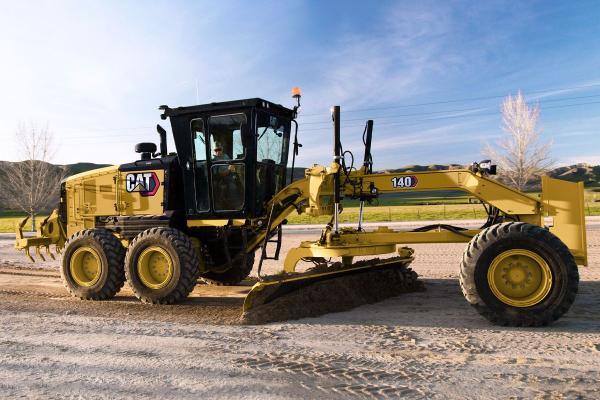
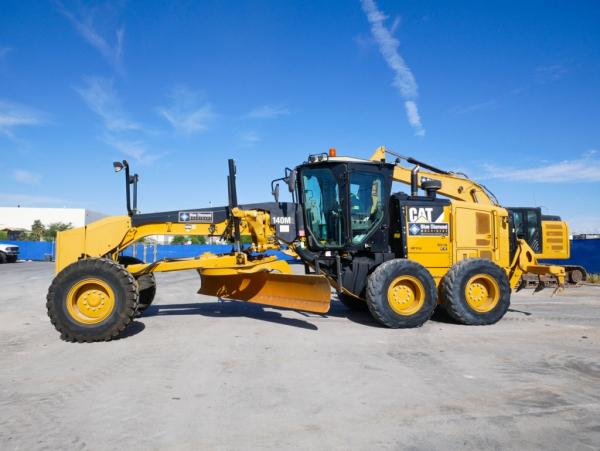
Overview of the CAT 140M2
The Caterpillar 140M2 is a versatile motor grader in CAT’s M‑Series lineup. Aimed at construction and maintenance users, it features a 12-foot moldboard, weighs around 44,600 lb, and is driven by a robust C9.3 ACERT engine with 193–243 hp, depending on the power mode. Operating speed reaches up to 29 mph, enabled by an efficient eight‑forward, six‑reverse powershift transmission.
Key Features and Technical Highlights - A C9.3 engine with VHP (Variable Horsepower) allows the grader to adapt power output based on gear selection, with net power peaking at 243 hp in gears 7–8.
- Hydraulics include variable-piston pumps supplying 55.7 GPM at 3,500 psi, enabling up to 7 simultaneous implement functions for precise control.
- The grader features a 60-inch diameter blade circle that rotates 360°, shifts up to 27–29 inches, and allows blade tip angles up to 40° forward and 5° back.
- Articulation and steering support 20° of flex and 32° of front axle oscillation, with a turning radius of approximately 25.5 ft.
- Hydraulic systems and operator environment include selectable Eco mode, Cat Grade with Cross Slope, joystick controls, optional AWD, and remote services for material savings and comfort.
Specifications at a Glance- Operating Weight: ~39,900 lb (standard), up to ~44,600 lb (AWD & add-ons)
- Engine Power: 193–243 hp (140M2), 202–243 hp (140M2 AWD)
- Fuel Capacity: ~110 gallons; hydraulic oil ~55 L (~14.5 gal)
- Transmission: 8F/6R powershift; speeds up to 29 mph forward, 22.9 mph reverse
- Blade Range: Depth of cut up to 28–29 in; lift above ground ~19 in
Performance and Operational Strengths- The Eco mode saves fuel by optimizing engine output during lighter-duty work, while Power mode provides maximum torque when needed.
- Advanced electro-hydraulic system and load-sensing hydraulics deliver smooth, responsive blade and implement control.
- Exceptional visibility stems from a sloped rear window, tapered engine hood, and angled cab doors—plus available rear camera options.
- Optional all-wheel drive (AWD) enhances traction for slopes, soft surfaces, and snow removal.
Common Issues and Field Observations- Some users report air-conditioning malfunctions, especially heater cores that allow hot coolant flow during summer—resolved by adding shut-off valves to coolant lines.
- On demo units, hydraulic fan motors have shown leaks, particularly in cold-weather conditions—lighter hydraulic oil showed improvement.
- A known fault occurred with the engine speed sensor wiring, resulting in engine RPM signal loss and erratic behavior; replacement of the sensor and harness solved the issue.
- Some older M‑Series units experienced transmission hesitations in low gears after a shift; servicing by experts helped restore shifting smoothness.
Real-World Cases and Anecdotes- A contractor in Arizona bought a 2012 140M2 AWD with ~5,000 hours for ~$112,500. The unit came equipped with joystick steering, rear camera, and scarifier attachment. They noted the blade circle was precise, and VHP mode held grade well even on hills.
- A 2013 unit sold in Colorado with ~8,500 hours for ~$118,750. It featured the cold start package, curved cutting edge, and ripper attachment. The operator praised comfort package upgrades and consistent hydraulic response even in cold conditions.
- A review from Australia lauded the spacious cab, joystick controls over levers, and programmable comfort features like Bluetooth and dehumidification—highlighting reduced fatigue for long shifts.
Terminology Explained for Operators- VHP (Variable Horsepower): Adjusts engine output based on gear selection for optimal efficiency or power.
- Load-Sensing Hydraulics: System that delivers fluid flow based on demand, improving fuel economy and system responsiveness.
- Eco Mode: Reduces engine output and fuel use when full power isn't necessary.
- powershift transmission: Hydraulic-electronic gear selection without clutch pedal.
- Circle Slip Clutch: Safety feature that protects the blade circle by slipping under overload.
- Articulation and Oscillation: The grader’s ability to pivot the frame and allow front axle movement for terrain adaptability.
- Moldboard: The grader blade used for cutting, spreading, and finishing material.
Maintenance Best Practices- Replace transmission, engine, circle gearbox, tandem case, and coolant fluids per the service schedule (~1,000 hours or annual intervals)
- Keep the circle gearbox slip clutch properly tensioned to prevent blade backlash
- Service air-conditioning and coolant lines to avoid operator comfort issues
- Use appropriate hydraulic fluids and filters for load-sensing systems to maintain efficiency
- Clean radiator fins and coolers regularly—essential in dusty or snowy environments
- Inspect blade cutting edges, wear strips, and circle teeth frequently and replace as needed
Conclusion
The Caterpillar 140M2 stands out as a reliable, powerful, and ergonomically advanced motor grader. Its flexible horsepower range, hydraulic precision, and high operator comfort make it ideal for road building, maintenance grading, utility work, and snow removal. While occasional issues like heater design quirks or sensor faults may occur, consistent maintenance and known fixes keep these machines running trouble-free. With service intervals stretched by efficient fluid systems and an operator-friendly cab, the 140M2 remains a solid investment for contractors seeking performance, control, and durability.
|
|
|
|
| Resetting Error Codes on Bobcat S150 Skid Steer: A Complete Guide |
|
Posted by: MikePhua - 07-30-2025, 06:52 PM - Forum: Troubleshooting & Diagnosing
- No Replies
|
|
The Bobcat S150 skid steer loader is a robust and reliable machine that is widely used in construction, landscaping, and material handling. However, like all heavy machinery, the Bobcat S150 is equipped with an onboard diagnostic system that can trigger error codes when certain issues arise. These error codes are essential for troubleshooting and addressing mechanical or electrical problems. In some cases, operators may need to reset the error codes, especially after repairs or maintenance.
This article provides a comprehensive guide on how to reset error codes on a Bobcat S150 skid steer. It will also delve into common issues that trigger these codes, their potential causes, and how to address them to keep the machine in optimal working condition.
Key Terminology - Error Codes: Diagnostic codes generated by the machine’s onboard computer to indicate specific issues or malfunctions within the system.
- ECM (Electronic Control Module): The brain of the machine, the ECM monitors and controls various components, including the engine, transmission, and hydraulic systems.
- Diagnostic Mode: A system that allows operators or technicians to access error codes and troubleshoot machine issues using a diagnostic tool or the machine’s built-in display.
- Reset: The process of clearing error codes from the system after a fault has been diagnosed and resolved.
Why Error Codes Appear
Error codes appear on the display screen of the Bobcat S150 for several reasons. Some of the most common causes include:- Engine problems: Low oil pressure, overheating, or sensor malfunctions can trigger error codes related to the engine.
- Hydraulic system malfunctions: Issues such as low hydraulic fluid or faulty pumps can activate specific hydraulic-related error codes.
- Electrical issues: Problems with wiring, connectors, or sensors can lead to diagnostic trouble codes.
- Transmission or drive system issues: Malfunctions within the drivetrain or transmission can also trigger error codes, particularly in relation to the power output of the machine.
How to Reset Error Codes on a Bobcat S150
Resetting error codes on a Bobcat S150 is a straightforward process that can be done using the machine’s control panel or a diagnostic tool. Here’s how to do it:
1. Turn Off the Machine
Before performing any work on the Bobcat S150, ensure the machine is turned off and the key is removed from the ignition. This ensures safety and prevents accidental activation of systems during the reset process.
2. Access the Diagnostic Mode
On the Bobcat S150, error codes can be accessed via the control panel. To enter diagnostic mode, follow these steps:- Insert the key and turn it to the “ON” position without starting the engine.
- Locate the “Display” button on the control panel.
- Press and hold the “Display” button for about 5 seconds until the display shows the error codes.
- The display will show a list of active error codes, which can be used to identify specific problems with the machine.
3. Identify and Address the Issues
Before resetting the error codes, it is essential to identify and resolve the issues causing the codes. If the error code is related to a mechanical or electrical fault, take the necessary steps to repair the problem. For example:- Low oil pressure: Check the oil level and condition, and top up or replace the oil if necessary.
- Hydraulic issues: Inspect the hydraulic fluid levels and check for leaks or damage in hoses or valves.
- Electrical problems: Inspect the wiring and connectors for any signs of wear, corrosion, or damage.
If the error code is not related to a real problem and has appeared due to a temporary glitch, it may be safe to proceed with resetting the codes.
4. Reset the Error Codes
Once the issue has been addressed or deemed non-critical, you can proceed to reset the error codes:- On the display panel, navigate to the “Reset” option using the menu buttons.
- Press the “Reset” button and hold it for a few seconds until the codes are cleared from the display.
- Once the codes are cleared, the machine’s control system should return to normal operation. If the issue was resolved, the error codes should not return. If the error codes reappear, it’s important to investigate further.
5. Start the Machine
After resetting the codes, start the machine and monitor the performance. If the error codes do not return and the machine is operating normally, the reset was successful. However, if the codes reappear or if you experience any operational issues, you may need to consult with a technician for further diagnostics.
Common Error Codes on Bobcat S150
Understanding the common error codes that may appear on your Bobcat S150 is crucial for diagnosing problems quickly. Some of the most common codes include:- Error Code 32: Hydraulic oil pressure issue. This can be caused by low hydraulic fluid, a malfunctioning pump, or a clogged filter.
- Error Code 35: Engine overheating. Ensure that the cooling system is functioning correctly, and check for coolant leaks or low coolant levels.
- Error Code 50: Faulty engine sensors. This may indicate a problem with the engine’s temperature, oil pressure, or fuel pressure sensors.
- Error Code 81: Electrical system issue. A loose or corroded wire connection can trigger this error.
- Error Code 99: Transmission problem. This can indicate low transmission fluid or a fault in the transmission system.
Preventive Measures to Avoid Error Codes
While resetting error codes can help keep your Bobcat S150 running smoothly, it’s important to take proactive steps to avoid the codes from appearing in the first place. Regular maintenance and proper care can prevent many of the issues that trigger these codes. Here are some tips:
- Regular Fluid Checks: Ensure that the engine oil, hydraulic fluid, and coolant are at the proper levels and in good condition. Dirty or low fluids can lead to system malfunctions.
- Scheduled Maintenance: Follow the manufacturer’s recommended maintenance schedule for routine checks and services. This includes inspecting components like belts, hoses, filters, and sensors.
- Electrical Inspections: Periodically inspect wiring and connectors for signs of wear, corrosion, or damage. Addressing these issues early can prevent electrical error codes from appearing.
- Keep the Machine Clean: Regularly clean the machine to prevent dirt, debris, and corrosion from affecting sensitive components such as the sensors and wiring.
Conclusion
The Bobcat S150 skid steer is a powerful and versatile machine that can handle a variety of tasks. However, like any piece of machinery, it can experience issues that trigger error codes. Resetting these error codes is a simple process that can be done using the machine’s control panel. However, it’s essential to first address the underlying issues that caused the codes to appear. Regular maintenance and careful inspection can help prevent many of the common problems that lead to error codes, ensuring that your Bobcat S150 continues to perform optimally for years to come.
|
|
|
|
| The Heat Trap: Diagnosing Transmission Overheating in the Caterpillar D8N Dozer |
|
Posted by: MikePhua - 07-30-2025, 06:52 PM - Forum: Troubleshooting & Diagnosing
- No Replies
|
|
Introduction: When One Gear Runs Hot
In the world of earthmoving machinery, the Caterpillar D8N dozer is a workhorse known for its durability and power. Yet even the most robust machines can falter under pressure. A peculiar issue has emerged in some D8N units: transmission overheating that occurs exclusively in second gear. This anomaly challenges conventional diagnostics and invites a deeper look into the mechanics of powershift transmissions, operator habits, and the subtle clues left behind by wear and pressure loss.
Understanding the Powershift Transmission
The D8N uses a powershift transmission—a hydraulic system that engages clutches to shift gears without interrupting power flow. Each gear range activates a specific clutch pack, and hydraulic pressure ensures firm engagement.
Key Terminology Explained - Powershift Transmission: A type of transmission that uses hydraulic pressure to shift gears without disengaging the engine.
- Clutch Pack: A set of friction and steel plates that engage to transmit torque in a specific gear.
- Teflon Ring: A sealing ring used on clutch pistons to maintain hydraulic pressure.
- Suction Screen: A mesh filter that captures debris before fluid enters the transmission pump.
- Pressure Test Ports (P1, P2): Diagnostic points used to measure hydraulic pressure in different gear ranges.
- Torque Converter Outlet Pressure: Pressure at the outlet of the torque converter, indicating flow to the cooler.
Symptoms and Initial Observations
Operators reported that the transmission temperature climbs only when operating in second gear. In first and third, the temperature remains stable. This behavior rules out general cooling system failure and points to a gear-specific issue. Fresh 30W transmission oil and clean filters were confirmed, yet small amounts of metal and clutch material were found in the pleats of the transmission filter—an early warning sign.
Pressure Testing and Findings
A full pressure test revealed that second gear had approximately 100 psi less pressure than first and third. This drop suggests internal leakage or clutch slippage. Despite strong pushing power in all gears, the reduced pressure in second gear allowed friction to build, generating heat and accelerating wear.
Root Cause: A Rolled Teflon Seal
Upon teardown, the culprit was found: a rolled Teflon ring on the second gear clutch piston. This compromised seal allowed hydraulic pressure to escape, causing the clutch to slip under load. The result was overheating, metal debris, and damage to the steel and friction plates.
Operator Habits and Gear Selection
Interestingly, the operator had a tendency to push in second gear—a practice questioned by technicians. While second gear offers more speed, it also demands more torque and generates more heat. After addressing this habit, the overheating persisted, confirming a mechanical fault rather than misuse alone.
Anecdotes from the Field
One technician recalled a similar case in a forestry application where a D8N overheated only in second gear. The issue was traced to a misaligned speed selector cable, causing partial engagement of the clutch pack. Another story involved a mining operation where repeated overheating led to a complete transmission rebuild—only to discover that the root cause was a cracked welded washer in the differential steer gear train, shedding metal into the system.
Comparative Insight: Transmission Behavior Under Heat
Transmission overheating in a single gear is rare. Most issues affect all ranges due to shared fluid or cooling systems. However, isolated overheating often signals clutch slippage, seal failure, or valve body malfunction. In automotive contexts, similar symptoms appear in 4L80E transmissions, where overheating in second gear can result from solenoid failure or fluid restriction.
Preventive Measures and Diagnostic Tips- Inspect Filters and Screens
Always cut open filters and inspect suction screens for metal or clutch debris.
- Run Full Pressure Tests
Compare pressures across all gear ranges to identify anomalies.
- Check Speed Selector Cable Adjustment
Misadjusted cables can cause partial clutch engagement.
- Monitor Torque Converter Outlet Pressure
Ensure proper flow to the cooler; low pressure may indicate blockage or pump wear.
- Evaluate Operator Practices
Gear selection under load can influence wear and heat generation.
Modern Monitoring and Predictive Maintenance
With advancements in telematics, some fleets now monitor transmission temperatures in real time. Alerts can be set for gear-specific overheating, allowing proactive maintenance. Predictive analytics may soon identify seal degradation before failure, using pressure fluctuation patterns and temperature rise rates.
Conclusion: A Lesson in Precision and Persistence
The D8N transmission overheating in second gear is a textbook case of how small mechanical failures can masquerade as complex system issues. It underscores the importance of thorough diagnostics, attention to operator habits, and the value of pressure testing. In heavy equipment, heat is both a symptom and a storyteller—revealing the hidden battles within hydraulic systems. And sometimes, all it takes is a rolled Teflon ring to bring a giant to its knees.
|
|
|
|
|



