| Welcome, Guest |
You have to register before you can post on our site.
|
| Online Users |
There are currently 497 online users.
» 0 Member(s) | 489 Guest(s)
Ahrefs, Amazon, Bing, Claude, Google, OpenAI, Semrush, Seznam
|
| Latest Threads |
Identifying and Sourcing ...
Forum: Parts , Attachments & Tools
Last Post: MikePhua
01-07-2026, 06:29 PM
» Replies: 0
» Views: 532
|
Cat 931B Brake Parts
Forum: Parts , Attachments & Tools
Last Post: MikePhua
01-07-2026, 06:29 PM
» Replies: 0
» Views: 284
|
Choosing Between Cat 228,...
Forum: General Discussion
Last Post: MikePhua
01-07-2026, 06:28 PM
» Replies: 0
» Views: 563
|
Hydraulic Delay When Lowe...
Forum: Troubleshooting & Diagnosing
Last Post: MikePhua
01-07-2026, 06:27 PM
» Replies: 0
» Views: 449
|
Bale Chopper and Mulcher ...
Forum: General Discussion
Last Post: MikePhua
01-07-2026, 06:26 PM
» Replies: 0
» Views: 326
|
Mini UC Maintenance
Forum: General Discussion
Last Post: MikePhua
01-07-2026, 06:25 PM
» Replies: 0
» Views: 316
|
Locating Wiring Informati...
Forum: General Discussion
Last Post: MikePhua
01-07-2026, 06:24 PM
» Replies: 0
» Views: 349
|
Case Industrial Brown Sub...
Forum: Parts , Attachments & Tools
Last Post: MikePhua
01-07-2026, 06:23 PM
» Replies: 0
» Views: 278
|
Dirt Work in West Virgini...
Forum: Construction & Urban Infrastructure Forum
Last Post: MikePhua
01-07-2026, 06:23 PM
» Replies: 0
» Views: 380
|
D207 P Hydraulic Steering...
Forum: Parts , Attachments & Tools
Last Post: MikePhua
01-07-2026, 06:22 PM
» Replies: 0
» Views: 305
|
|
|
| When the 544J Goes to Neutral Unexpectedly: Causes, Diagnostics & Solutions |
|
Posted by: MikePhua - 08-13-2025, 09:24 PM - Forum: Troubleshooting & Diagnosing
- No Replies
|
 |
Understanding the Issue
In certain cases, a John Deere 544J loader may unexpectedly shift itself into neutral—even while driving. This abrupt disengagement can disrupt operations and raise safety concerns, especially if it occurs under load or in critical situations.
Terminology Note - TCU (Transmission Control Unit): The electronic module governing gear engagement, monitored via various sensors and solenoids.
- K3 Solenoid: A clutch-related solenoid that, when shorted or faulted, may force the transmission into neutral.
- Deoxidizer (e.g., Caig Deoxit D5): A cleaner and contact restorer used to clean connector surfaces and restore electrical continuity.
How the TCU Reacts to Faults
The TCU actively monitors signals from solenoids, switches, and sensors. If it detects a fault—such as a short to ground or failed sensor—it may disengage the transmission as a safety measure, sending the loader into neutral unexpectedly.
Primary Diagnostic Steps- Check Solenoids and Wiring
Worn or shorted solenoid wiring can confuse the TCU, prompting it to neutral out the transmission. Cleaning agents like Caig Deoxit can help restore contact and clarity—but repeated issues likely mean replacement is needed.
- Test for "K3 Sol Short to Ground" Fault Code
When this code appears, it usually indicates a problem with the K3 solenoid wiring harness or possibly the solenoid itself. Isolate by unplugging the harness at the transmission, and test if the fault persists.
- Inspect the FNR (Forward-Neutral-Reverse) Shifter
Dirt or wear in the shifter assembly can produce false signals or intermittent engagement. Many technicians recommend replacing older FNR shifters with Hall-effect versions for reliability.
- Perform Continuity and Ground Tests
Trace wiring through connector X23 (transmission controller) to verify whether wires—like P78 (red) and T06 (blue)—are grounding improperly.
Troubleshooting Path: Step-by-Step
- Clear existing codes, then operate in safe conditions while noting any new faults.
- Clean connectors and inspect wiring visually. Apply Deoxit to suspect areas.
- Use an ohmmeter to test for continuity to ground in K3 solenoid circuit.
- Unplug TCU harness at transmission—if a fault clears, the problem lies in the harness or solenoid.
- Replace FNR shifter with Hall-effect version if mechanical wear is suspected.
- Monitor for reoccurrence after each fix.
Real-World Mechanic’s Insight
A seasoned technician recounted diagnosing a recurring neutral fault on a 544J:
Quote:"After cleaning the connectors and applying deoxidizer, the fault cleared temporarily. But when codes returned, the wiring was at fault. Testing showed shorts at the solenoid side. Replacing the K3 solenoid and upgrading the shifter assembly finally held the fix."
Additional Considerations- Intermittent Shorts: If resetting (shutting down and restarting) resolves the issue, suspect a loose or shorting harness.
- Preventive Upgrades: Investing in a Hall-effect shifter and quality connectors can dramatically reduce future frustrations.
- Record-keeping: Note harness routing, part numbers, and wire colors in your service log for future reference.
Quick-View Troubleshooting List- Clean connectors with contact cleaner
- Run continuity tests on solenoid wiring
- Unplug harness at transmission to isolate the fault
- Replace worn shifter with Hall-effect unit
- Monitor for new fault codes after each step
Summary
When a 544J loader unexpectedly shifts to neutral, it's most frequently due to electrical faults in solenoid circuits (especially the K3 clutch solenoid) or degraded components like FNR shifters. A disciplined approach—cleaning, testing, isolating the harness, and replacing key parts—restores stability. Upgrading to Hall-effect switching and maintaining clean, reliable connections are wise investments that enhance longevity and avoid frustrating failures.
|

|
|
| Caterpillar 314D Running Hot: A Smooth but Thorough Guide to Cooling System Troubleshooting |
|
Posted by: MikePhua - 08-13-2025, 09:24 PM - Forum: Troubleshooting & Diagnosing
- No Replies
|
|
The Symptoms
On the Caterpillar 314D excavator, some operators report engine temperature rising rapidly—especially when the air conditioning (A/C) is switched on—even though the gauge normally stays around mid-range under load. Removing the thermostat reveals a 160 °F unit, which functions correctly in hot water. Yet, when the A/C engages, the temperature spikes quickly. The radiator looks clean, but airflow appears compromised due to debris buildup between the radiator and oil cooler.
How the 314D Cooling System Works
Understanding how this system functions helps pinpoint trouble spots: - Thermostat Orientation: The thermostat's copper capsule must face downwards, toward the engine block, to sense temperature properly and open at the correct threshold.
- Shroud and Airflow: A cooling fan creates airflow that passes through the oil cooler first, then the radiator. If dirt or debris blocks airflow through either core, heat rejection drops dramatically—even if the radiator appears clean from the outside.
- A/C Load Impact: Activating the air conditioner adds heat to the charge-air cooler assembly. That extra load can quickly push coolant temperature upward if airflow is marginal.
Real-World Advice from Operators
From seasoned users comes a no-nonsense approach:- Fan, Belts, and Shroud: Confirm the fan is mounted correctly (not backwards), all belts are tight, and shrouds are intact—these guide airflow precisely where it's needed.
- Debris in Coolers: Simply looking at the radiator’s outer fins isn't enough. Dirt often accumulates between layers—like mud and grass trapped between the oil cooler and radiator. Full cleaning often requires removing the cooler stack and splitting it for access.
- Cleaning Technique: One veteran fabricated an “air lance” from pipe, fittings, and a butterfly valve. With compressed air (around 70 psi), he blew backward from both sides—engine side and front—while the engine ran to expel hidden debris. ("Blow toward the engine, then start the engine and blow it again from the outside.")
- Hot Water Flush: A simpler field method involved fitting a 45° nozzle to a pressure-washer wand and using very hot water to flush the radiator and cooler thoroughly until the outgoing water ran clean.
Step-by-Step: What to Inspect and Fix
- Thermostat Check
- Confirm the thermostat’s orientation: button (copper capsule) side must point down into the block—not up toward the radiator.
- Test it in hot water to ensure it opens near its rated temperature (~160 °F).
- Airflow Components
- Inspect and tighten fan belts.
- Check the fan’s direction—ensure proper airflow orientation.
- Make sure the fan shroud is intact and properly seated.
- Clean Coolers Thoroughly
- Remove the radiator/oil cooler assembly if necessary.
- Use compressed air with a blast nozzle from both sides while the engine is off and again when running to clear embedded debris.
- Alternatively, use hot-water pressure washing—but avoid direct water contact with electrical components.
- Check A/C Impact
- If engine overheats quickly when A/C turns on, that extra load may just be tipping an already compromised cooling system over the edge. After cleaning, this symptom often disappears.
- Monitor Results
- After cleaning and reassembly, run the machine with the A/C on. Temperature should stay stable near mid-gauge.
- If overheating persists, consider thermostat replacement or further investigation into coolant flow or potential coolant restriction—but usually, airflow and thermostat orientation are root causes.
Summary Table: Causes & Solutions- Blocked Cooling Airflow
Cause: Debris between oil cooler and radiator
Solution: Deep clean cores with air lance or hot water flush
- Thermostat Installed Backwards
Cause: Capsule facing up reduces proper opening
Solution: Ensure capsule (copper button) points toward block
- Fan or Belt Issues
Cause: Fan installed backwards; loose belts
Solution: Reorient fan, tension belts, check shroud
- A/C Heat Load
Cause: Elevated charge-air temps when A/C active
Solution: Improve airflow; clean coolers so system can handle extra heat
Why It Matters
Overheating—even when it only occurs under higher load—harms engine components. Coolant that runs too hot degrades lubrication, accelerates wear, and risks costly failure. A properly functioning cooling system keeps oil and hydraulics safe and ensures uninterrupted operation—even when demanding equipment options like A/C are engaged.
Parting Thoughts
Many technicians bypass the basics—like airflow and thermostat orientation—and dive straight into replacing parts. But as operators of the 314D confirm, the most effective fixes are often the simplest: ensure clean, unrestricted airflow and correct thermostat placement. Once those are addressed, overheating is often a solved mystery—even on blazing hot days. Let me know if you'd like help adapting these steps for your maintenance schedule or timeframe!
|
|
|
|
| Comprehensive Guide to Diagnosing and Solving Gear Engagement Issues on the Caterpillar 988 Wheel Loader |
|
Posted by: MikePhua - 08-13-2025, 09:23 PM - Forum: Troubleshooting & Diagnosing
- No Replies
|
|
Introduction to Caterpillar 988 Wheel Loader
The Cat 988 is a heavy-duty large wheel loader extensively used in mining, quarrying, and construction due to its robust design and high productivity. This machine is designed to handle big loads efficiently with a powerful drivetrain and hydraulic system. Understanding its mechanical and transmission systems is vital when troubleshooting operational issues, such as gear engagement irregularities.
Overview of Gear Engagement Issue on Cat 988
Operators may sometimes experience a situation where the machine seems to "jump out of gear" or behaves as though the clutch is being pushed in intermittently during first and second gears. This condition is often transient, returning to normal after shifting to neutral and back into gear. Despite this, the machine continues to operate without noticeable slipping or performance degradation during normal operation.
Key Technical Specifications of Caterpillar 988 Relevant to Gear Engagement - Operating Weight: Approximately 112,574 lbs (51,073 kg) for models like the 988K
- Bucket Capacity: Ranges between 6.4 and 8.4 cubic yards (4.9–6.4 m³), supporting heavy material handling
- Engine: Powerful Cat C18 diesel engine that delivers around 580 horsepower
- Transmission: Typically features a planetary power shift transmission system enabling multiple forward and reverse gears
- Hydraulic System: High-flow (up to about 150 gallons per minute) hydraulic system controlling lifting, steering, and braking systems
- Drive Type: Four-wheel drive with durable axles and differential systems ensuring traction and power delivery
Potential Causes of Gear Jumping or Perceived Clutch Engagement Loss- Transmission Wear or Adjustment Issues:
Planetary power shift transmissions rely on multiple clutches and bands. Wear or improper adjustment in clutch packs may cause intermittent disengagement under load but not full slippage, explaining the "jumping out of gear" sensation.
- Torque Converter or Clutch Problems:
A malfunctioning torque converter or clutch pack may cause transient loss of drive if fluid coupling or mechanical engagement falters temporarily.
- Hydraulic Control Circuit Issues:
Transmission clutches are often hydraulically actuated. Insufficient or fluctuating hydraulic pressure due to pump wear, leakages, or contamination can result in inconsistent gear engagement.
- Shift Linkage or Sensor Faults:
Mechanical misalignments or electronic sensor malfunctions related to shift position detection can cause erratic transmission responses.
- Transmission Control Module (TCM) or Software Anomalies:
In electronically controlled transmissions, control module errors or outdated software may cause intermittent gear holding issues.
- Operator Technique or Environmental Factors:
Operating conditions such as heavy loads, steep grades, or abrupt direction changes can impact transmission behavior. Operator clutch or throttle use patterns might also influence perceivable engagement.
Diagnostic and Troubleshooting Approaches- Visual and Operational Checks:
Examine transmission fluid level and condition. Bank on manufacturer recommended specifications for fluid type and changed intervals to ensure hydraulic circuit health.
Inspect linkage for physical damage or wear.
- Hydraulic Pressure Testing:
Test pressure at transmission clutch actuators during engagement to verify sufficient flow and pressure stability.
- Transmission Slip Test:
Use diagnostic equipment or manual methods to detect clutch slippage or torque converter inefficiency.
- Electronic Diagnostic Scan:
Check TCM for fault codes or erratic sensor readings influencing shift quality.
- Operator Feedback Analysis:
Confirm if symptoms coincide with machine load, temperature, or specific operation modes to identify contributing factors.
Practical Solutions and Recommendations- Transmission Fluid Maintenance:
Regularly replace transmission fluid and filters following Caterpillar schedules to avoid contamination and hydraulic circuit degradation.
- Clutch Pack Inspection and Adjustment:
Service clutch packs, replacing worn components and adjusting clearances to ensure proper engagement.
- Hydraulic Pump and Circuit Repair:
Fix leaks or replace faulty components that affect hydraulic pressure delivery to clutches.
- Shift Linkage and Sensor Calibration:
Adjust or replace misaligned mechanical linkages; recalibrate or repair sensors responsible for gear position feedback.
- Control Module Software Update:
Update TCM firmware per manufacturer advisories; clear fault codes and reprogram as needed.
- Operator Training:
Educate operators on smooth gear shifting practices and operating conditions to minimize stress on the transmission system.
Terminology Explained- Planetary Power Shift Transmission: A type of transmission using planetary gear sets and hydraulic clutches for smooth power delivery and multiple gear ratios.
- Torque Converter: A fluid coupling device between engine and transmission converting and multiplying torque.
- Clutch Pack: Multiple friction discs that engage or disengage to transmit power through the transmission.
- Transmission Control Module (TCM): An electronic control unit managing transmission operation and shift scheduling.
- Hydraulic Pressure: The force exerted by hydraulic fluid essential for clutch and brake actuation within the transmission.
- Shift Linkage: Mechanical or electronic connection between operator controls and the transmission shifting mechanism.
Case Story: Resolving Intermittent Gear Engagement on a Cat 988
A mining operation reported a Cat 988 wheel loader intermittently feeling like it was slipping out of gear during heavy loading cycles in first and second gears. Initial fluid analysis showed contamination and low hydraulic pressure in the transmission circuit. Subsequent transmission fluid replacement and filter change improved hydraulic performance.
Clutch pack inspection found worn friction discs requiring replacement. After servicing the hydraulic pump and reconstructing the clutch assemblies with OEM parts, machine operation stabilized. Operator retraining on smooth gear shifts and avoiding abrupt directional changes culminated in consistent transmission performance and eliminated gear jumping sensations.
Summary List of Diagnostic Points and Corrective Actions- Inspect transmission fluid cleanliness and level; perform scheduled changes.
- Test hydraulic pressure in clutch control circuits for consistency.
- Examine clutch packs for wear and proper adjustment.
- Check shift linkage integrity and sensor signals.
- Scan transmission control module for faults; update software if available.
- Replace worn or damaged components with genuine OEM parts.
- Train operators on smooth shifting and load management techniques.
- Monitor machine under various operational stresses to confirm resolution.
Additional Recommendations- Keep transmission service kits and filters in inventory for prompt repairs.
- Schedule regular transmission system inspections and preventative maintenance to prevent failures.
- Utilize authorized Cat service centers for advanced diagnostics and software updates.
- Document all maintenance actions and operational observations to assist in long-term machine health management.
- Use onboard diagnostics and telematics, if available, for real-time transmission health monitoring.
Conclusion
Gear jumping or repeated perceived clutch engagement loss on the Caterpillar 988 wheel loader can stem from wear and hydraulic issues within the transmission system. A comprehensive approach including fluid maintenance, hydraulic pressure checks, clutch pack servicing, linkage inspection, and electronic control evaluation is essential for timely resolution.
Real-world examples demonstrate that thorough maintenance and repair combined with operator awareness restore reliable, smooth gear engagement and maximize the productivity and longevity of this powerful machine.
This detailed guide equips technicians, operators, and fleet managers with essential knowledge, diagnostic strategies, terminology, and practical solutions to effectively handle gear engagement issues on the Cat 988 wheel loader.
|
|
|
|
| Conveyor Belt Repair: Strategies, Terminology, and Field-Proven Solutions |
|
Posted by: MikePhua - 08-13-2025, 09:23 PM - Forum: General Discussion
- No Replies
|
|
Introduction to Conveyor Belt Repair
A conveyor belt serves as the backbone of many industrial operations—from mining and manufacturing to logistics and food processing. When damage strikes, knowing how to assess the issue, choose the right repair method, and execute it effectively can mean the difference between short downtime and costly disruption.
Terminology Notes
These terms provide clarity throughout the repair process: - Carcass: The underlying fabric or cord structure that gives the belt its strength.
- Vulcanization: A repair process using heat and pressure to fuse belt ends back together.
- Fasteners (metal lacing): Mechanical devices that join belt ends, often used for quick fixes.
- Cold curing (cold bonding): An adhesive-based repair done without heat, typically slower to cure.
- Dutchman / Saddle: A technique where the damaged section is removed and replaced with patch material.
- Rip: A tear or cut in the belt, often requiring immediate attention to prevent catastrophic failure.
Types of Belt Damage and When to Repair vs. Replace- Minor frays or surface wear: These can be trimmed and monitored.
- Rips, tears, or splice failures: Classified as serious—needing repair.
- Guideline: If damage affects ≤ 25% of belt width, repair is usually viable; beyond that, full resplice or replacement is advised.
Repair Methods: Options and Applications
- Vulcanization (hot splice)
- Process: Clean, align ends; apply adhesive; use heat/pressure to bond; allow cooling.
- Strength: Offers highest recovery of original belt strength.
- Types:
- Thermoset rubber (e.g., natural rubber, neoprene): Requires ~250°F, longer cooling.
- Thermoplastic (e.g., PVC, PU): Requires higher heat (325–375°F), fast cooling.
- Limitations: For food-grade belts (thermoplastic), repairs may be unsuitable due to sanitation concerns.
- Metal fasteners
- Method: Use mechanical lacing (e.g., Bolt Solid Plate) to join belt ends.
- Pros: Fast and staff-friendly.
- Cons: Less durable, safety risks (protruding edges), unsuitable for food environments.
- Cold curing (adhesive repair)
- Process: Clean damage, apply cement and filler, wait 24–36 hours to cure.
- Pros: Works when hot vulcanization isn’t feasible.
- Cons: Rigid splice, long cure time, less durable at transfer points.
- Dutchman (saddle) method
- Process: Remove damaged section; splice in a new belt piece via adhesive or vulcanization.
- Considerations: The insert must match belt width; avoid placing splices near pulleys.
- Hot-air welding for mono-material belts
- Process: Bevel edges (e.g., 45°), apply heat gun and weld, trim smooth.
- Pros: Quick, effective for plastic belts in situ.
Common Problems, Solutions, and Best Practices- Slippage
- Causes: Low tension, worn/smooth pulleys, overloading, cold environment.
- Solutions: Adjust tension, refurbish or lag pulleys, adhere to load limits, use cold-resistant belts.
- Misalignment / Tracking issues
- Symptoms: Belt drifts off-center, uneven wear.
- Mitigation: Realign using adjustment mechanisms and tools like laser alignment.
- Seized rollers
- Causes: Debris, lack of lubrication, misalignment.
- Solutions: Clean/lubricate regularly; replace damaged rollers promptly.
- System-wide maintenance
- Regular inspection, cleaning, lubrication, and component replacement help avoid repairs and extend belt life.
On-the-Ground Story
A processing plant under tight downtime constraints had a ripped belt mid-shift. Without vulcanization equipment onsite, the team used metal fasteners as a stopgap until proper repairs could be made. Though this got operations running, over the next week, the splice started showing wear—clearly demonstrating that temporary fixes only delay the inevitable. The lessons? Always plan for full repair when time allows and avoid shortcuts if possible.
Quick Reference: Repair Methods vs. Use Case- Vulcanization: Primary method for durable repairs; requires field or shop setup.
- Metal fasteners: Temporary emergency fix; quick but not long-lasting.
- Cold curing: Backup when hot methods are impossible; slower and less flexible.
- Dutchman repair: Useful for replacing larger damaged sections; must respect size and placement.
- Hot-air welds: Ideal for specific plastic belts, fast and field-convenient.
Checklist: Smart Repair Planning- Evaluate damage type and extent
- Match repair method to belt material and urgency
- Prepare tools: clamps, heat press, adhesives, fasteners
- Avoid splices near pulleys or idlers
- Ensure safety provisions when using hot methods or adhesives
- Post-repair, run test cycle and inspect splice under load
In Summary
Repairing a conveyor belt is both art and science. Understanding the right terminology, knowing the strengths and limits of each method, and applying routine maintenance can keep your operations moving with minimal interruption. Whether patching a rip, stitching together a splice, or replacing an entire section, smart choices and timely action are the keys to durable, safe conveyor performance.
|
|
|
|
| Caterpillar 930G That Won’t Start: Causes, Diagnostics, and Fixes |
|
Posted by: MikePhua - 08-13-2025, 09:22 PM - Forum: Troubleshooting & Diagnosing
- No Replies
|
|
Understanding the 930G and Its Starting Challenges
The Caterpillar 930G is a compact wheel loader powered by the Cat 3056E diesel engine and equipped with modern electronics. While reliable, its sophisticated systems mean that starting issues can stem from mechanical, fuel, or electronic failures, especially in high-hour machines.
Common Culprits Behind No-Start and Hard-Start Scenarios
- Fuel System Airlocks or Leaks
Diesel engines demand an airtight fuel supply. Air seeping into lines—whether due to leaks, cracked housing, or poor sealing—can cause extended cranking, sputtering starts, or no-starts entirely. One user noticed air bubbles even when feeding clean diesel directly to the injection pump, which underscored a low-pressure side leak or weak suction system.
- Aging Fuel Pumps or Restrictors
An older injection pump may struggle to build adequate pressure—especially right after shutdown. Even after bleeding, if fuel flow remains sluggish, the pump itself may be worn out.
- Electrical or ECM Failures
In cases where the instrument cluster fails to complete self-diagnostics—flashing only an orange warning symbol—and even swapping in a new cluster doesn’t help, the problem can lie deeper. Power and ground may reach the ECM located under the cab, but if the ECM fails to communicate or respond, key functions, including starting sequence, are compromised.
Real Operator Insights & Field Solutions- One operator dealing with a loader that would start hard in cold and then refuse to restart after shutdown found the root cause was a cracked filter housing. Replacing it resolved the issue completely—highlighting how small, often-overlooked components can be critical.
- The same user shared their successful troubleshooting steps:
- Replaced filters and bled them thoroughly
- Replaced primer pump line to the secondary filter
- Confirmed that priming was functioning correctly
- Fed diesel just ahead of the secondary filter and bled via injectors
- Once clean pressure was achieved, reconnected the original lines and secured consistent starts.
Diagnostic & Repair Checklist
Use this list in sequence to quickly narrow down the no-start cause:- Fuel Check
- Use a transparent hose to observe fuel flow from the return line to tank—look for air bubbles.
- Put diesel in a clear container before the pump or filter and crack the injector lines to verify steady fuel delivery.
- Bleeding and Priming
- Loosen the bleeder screws on the filter housing and prime until only diesel (no air) flows, then tighten and continue until resistance is felt.
- Inspect for Small Cracks and Leaks
- Check filter housings, quick connectors, and siphon lines. Cracks—even hairline—can cause major issues.
- Evaluate Pump Performance
- If primed and tested but still no-start or low pressure, test or consider the fuel injection pump as a potential culprit.
- ECM and Electrical Diagnostics
- If the instrument cluster isn’t running self-tests or shows no system hours, verify ECM has clean power and ground.
- Check for 5 V/8 V sensor supplies. Lack of these indicates ECM malfunction.
- A non-responsive ECM often means replacement and flashing will fix it.
Summary Table: Failure Modes & Fixes- Air in Fuel → Bleed filters, spot and seal leaks, verify primer pump operation
- Cracked Filter Housing → Replace housing, especially after similar symptoms
- Weak or Faulty Pump → Evaluate fuel delivery pressure; replace if life-expired
- ECM or Instrument Cluster Issues → Confirm voltages and communication; replace ECM if dead
Real-Life Anecdote
One cold morning, an operator pressed the ignition key on a 20,000-hour 930G. It cranked but refused to fire. After a battery of bleeding, priming, and fuel-line-swaps, success came only when clean diesel was introduced directly before the secondary filter. Until filters were replaced and lines reconnected, the loader remained temperamental. Eventually, a tired pump was suspected—but it kept running thanks to methodical bleeding and persistence.
Parting Advice
When a 930G just won’t start, don’t leap to tech-heavy diagnostics immediately. Start simple—with fuel quality, bleed the lines, confirm the primer pump, inspect for pol cracks. Only then, move to ECM and electrics. A systematic, patient approach often reveals that the fix is tight… or leaky… but not necessarily complicated.
|
|
|
|
| Comprehensive Guide to Pump Shaft Seal Issues and Replacement on the John Deere 310A |
|
Posted by: MikePhua - 08-13-2025, 09:21 PM - Forum: Troubleshooting & Diagnosing
- No Replies
|
|
Introduction to John Deere 310A Hydraulic Pump Shaft Seal
The John Deere 310A backhoe loader, widely used in construction and agricultural operations, relies heavily on its hydraulic system for effective machine performance. A critical component of this system is the hydraulic pump shaft seal, which prevents hydraulic fluid leaks at the point where the pump shaft exits the housing. Proper functioning of the pump shaft seal ensures optimal hydraulic pressure and minimizes contamination risks. When this seal fails, it often leads to leakage, reduced performance, and potential damage to hydraulic components.
This guide elaborates on the pump shaft seal’s function, common failure modes, replacement considerations, maintenance tips, and practical solutions for the John Deere 310A hydraulic pump. It also includes explanations of related technical terms, illustrative case stories, and recommended best practices.
Function and Importance of the Pump Shaft Seal - The pump shaft seal fits tightly around the rotating shaft that drives the hydraulic pump, preventing hydraulic oil from leaking out of the pump housing.
- It maintains hydraulic pressure integrity by ensuring fluid stays within the system.
- Prevents contaminants such as dirt and water from entering the pump, which could cause accelerated wear or hydraulic failure.
- Typically constructed from durable elastomer materials with a specialized lip design for sealing rotating shafts effectively.
Common Causes and Symptoms of Seal Failure- Wear and Tear: Over time, constant rotation and pressure cause the seal lip to wear down, losing sealing effectiveness.
- Contamination: Dirt, grit, or debris trapped near the seal surface can damage the sealing lip or seat.
- Improper Installation: Incorrect installation can cause the seal to deform, leading to leaks right from the start.
- Shaft Misalignment or Damage: A bent or scored pump shaft can prematurely wear the seal.
- Exposure to Heat and Chemicals: Prolonged exposure to high temperatures or incompatible hydraulic fluids can degrade seal materials.
- Seal “Quad Ring” Failure: Some internal seals, like the square-sided “quad ring” combined with backup washers, can blow or deteriorate causing leakage.
Symptoms include:- Noticeable hydraulic oil leakage around the pump area, often accumulating under the machine.
- Reduced hydraulic fluid levels requiring frequent top-ups.
- Possible decrease in hydraulic pressure or pump efficiency.
- Visible damage or wear on the pump housing or shaft area.
Seal Specifications and Part Details- Commonly referenced seal types for the 310A pump shaft include the “BSP-963 Berliss” or equivalent pump shaft seals such as TYPE 6A, designed for a 5/8 inch shaft diameter.
- Seal kits often include:
- Elastomer main sealing ring.
- Teflon backup washers or rings to reinforce sealing and prevent extrusion.
- Quad rings or square cross-section seals internally to enhance sealing where necessary.
- OEM part numbers such as RE580260 correspond to premium hydraulic pump shaft seals designed specifically for John Deere industrial and construction models, ensuring compatibility and durability.
Step-by-Step Considerations for Seal Replacement- 1. Preparation:
- Park the machine on level ground with the hydraulic system depressurized.
- Clean the pump area thoroughly to avoid contamination entering during disassembly.
- 2. Access:
- Remove protective covers and disconnect hydraulic lines if necessary to access the pump shaft.
- 3. Remove the Old Seal:
- Carefully extract the worn seal using appropriate pullers or seal removal tools. Avoid damaging the pump housing or shaft surface.
- 4. Inspect Shaft and Housing:
- Check the shaft for scoring, grooves, or bends.
- Clean the shaft and seal bore thoroughly using lint-free cloths and solvent.
- Smooth minor shaft imperfections using fine emery cloth if necessary.
- 5. Install the New Seal:
- Lubricate the new seal lip and shaft face with clean hydraulic oil or specified lubricant.
- Use a seal driver or a soft-faced mallet to evenly press the seal into the bore without distortion.
- Verify correct seal orientation; most shaft seals have a spring or lip facing inwards to the fluid.
- 6. Reassemble and Test:
- Reattach any components dismantled during the process.
- Refill hydraulic fluid if lost during servicing.
- Test the hydraulic system for leaks and proper pressure restoration.
Terminology Explained- Pump Shaft Seal: A sealing device preventing hydraulic fluid leakage around the rotating pump shaft.
- Quad Ring: A seal with a square cross-section designed to enhance sealing performance compared to traditional O-rings.
- Teflon Backup Washer: A rigid washer that supports the seal lip, preventing extrusion under pressure.
- Seal Driver: A tool used to install seals evenly without damage.
- Hydraulic Pressure: The force exerted by hydraulic fluid within the pump and system, essential for component operation.
- Elastomer: A rubber-like polymer material used for flexible and resilient seal lips.
Case Story: Fixing a Severe Hydraulic Leak on a John Deere 310A
A construction operator noticed rapid hydraulic fluid loss and visible leakage at the hydraulic pump shaft area of his John Deere 310A. Despite the pump maintaining pressure and flow, the leaking seal caused frequent fluid top-ups and messy worksite conditions.
A technician performed seal inspection and observed the quad ring inside the pump was blown, and the main shaft seal lip was noticeably worn. After procuring a quality replacement seal kit that included the quad ring and backup washers, the seal was replaced carefully with proper lubrication and installation tools.
Post-repair, the leak was fully resolved, hydraulic fluid levels stabilized, and the machine operated cleanly for extended periods without fluid loss. This repair improved operational efficiency and reduced maintenance downtime significantly.
Summary List of Key Points on John Deere 310A Pump Shaft Seal- Essential component preventing hydraulic fluid leakage at pump shaft exit.
- Common failure due to wear, contamination, installation errors, or shaft damage.
- Replacement involves careful removal, shaft inspection, proper lubrication, and correct seal installation.
- Seal kits include elastomer lips, quad rings, and Teflon backup washers for enhanced sealing.
- OEM seal part RE580260 is praised for durability and fit on John Deere equipment.
- Regular inspection helps detect early leaks before major hydraulic system impact.
- Use of specialized seal drivers and lubricants prevents damage during installation.
Additional Practical Advice and Solutions- Inspect hydraulic fluid cleanliness regularly to prevent abrasive wear on seals and pump components.
- Keep a maintenance log documenting seal replacements and hydraulic system condition for predictive servicing.
- Utilize professional tools when servicing seals to ensure even fits and prevent deformation.
- Train technicians on seal orientation and installation torque specifications critical for long-life sealing.
- Consider upgrading seals to premium materials if operating in harsh conditions or extreme temperatures.
- Store spare seals in clean, dry environments to preserve elastomer integrity.
Conclusion
The pump shaft seal of the John Deere 310A hydraulic pump is a critical part to maintain system integrity and prevent fluid loss. Proper understanding of seal construction, failure causes, and replacement procedures ensures effective maintenance routines. Timely seal replacement restores hydraulic system reliability and reduces costly downtime.
Real-life repair cases demonstrate the value of using genuine or high-quality seals, comprehensive shaft inspections, and professional installation techniques to achieve lasting results. With attentive maintenance and awareness of common failure modes, operators and service personnel can sustain the hydraulic performance of John Deere 310A machines with confidence.
This detailed guide combines technical knowledge, practical steps, terminology clarification, and useful repair insights to support maintaining hydraulic pump shaft seals on the John Deere 310A for enhanced machine longevity and efficiency.
|
|
|
|
| Kato SR-250 Rough Terrain Crane: Performance, Features, and Real-World Insights |
|
Posted by: MikePhua - 08-13-2025, 09:21 PM - Forum: General Discussion
- No Replies
|
|
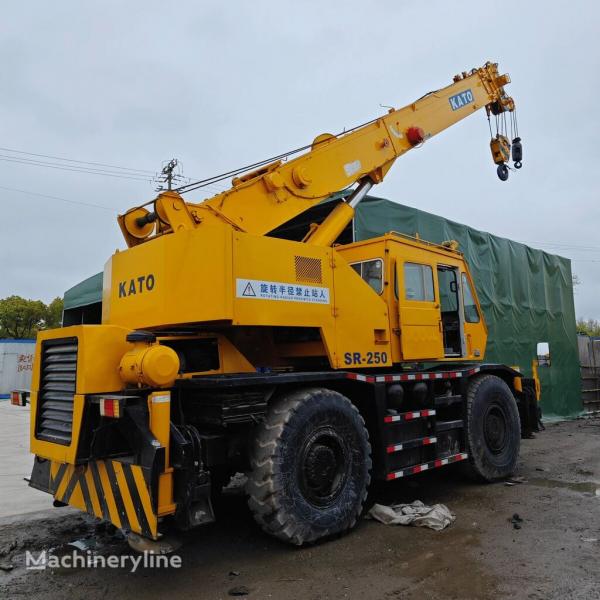
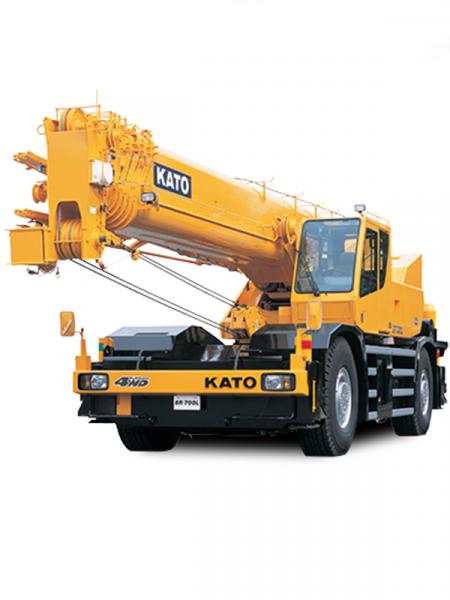
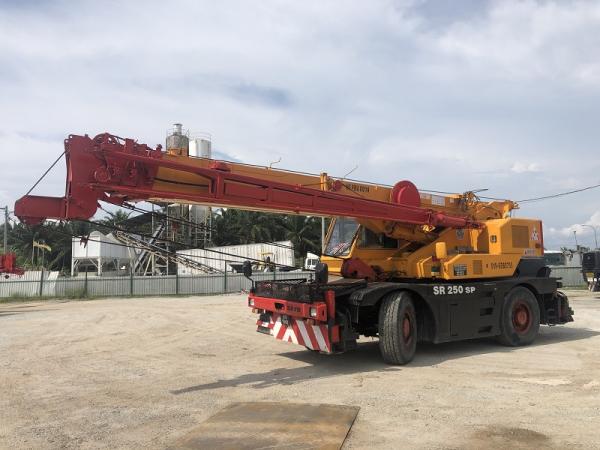
Overview
The Kato SR-250 (also known as KR-25H-V series) is a robust 25-ton rough terrain crane that excels in both mobility and lifting power. Designed for demanding job sites, it balances compact dimensions with versatile hydraulic performance for lifting in tight or uneven terrain.
Core Specifications - Lifting Capacity:
- 25 ton at 3.5 m radius
- At 16.4 m radius: 19 t
- At 23.5–23.45 m: ~12.5 t
- At full 30.5 m boom extension: ~7–8 t
- Reach & Height:
- Main boom: 9.35–30.5 m (4 telescoping sections)
- Fly jib: 8.7–13.1 m, hydraulically offset 5°–60°
- Max lift heights: Boom ~31.2 m, with jib up to ~44.8 m
- Mobility & Stability:
- Gross vehicle weight: ~26,495 kg
- Dimensions (L×W×H): ~11,565 × 2,620 × 3,475 mm
- Drive: 4×2 road, switchable to 4×4 for rough terrain
- Travel speed: ~49 km/h
- 4-speed forward and reverse transmission
- Outriggers extend to ~6.6 m for stabilization
- Performance & Hydraulics:
- Engine: Mitsubishi 6D16T turbo-diesel, ~220 PS (at 2,800 rpm), torque ~65 kg·m (at 1,600 rpm)
- Hydraulic reservoir: around 450 L
- Main winch speeds: ~125 m/min (main), ~112 m/min (auxiliary); hook speeds ~16–17 m/min
- Boom elevation: 0°–83° in ~40 s; Telescoping 9.5–30.5 m in ~93 s
- Slew: Full 360° rotation, ~2.5–2.9 rpm
- Safety & Controls:
Equipped with load charts for various radii, automatic brakes, overloaded prevention systems, outrigger locks, and Kato ACS (Automatic Crane System) for operational safety
Performance in Real Use
Early operators praised the SR-250’s compact footprint and power. It excels in confined sites thanks to 4×4 capability and a tight turning radius. Hydraulic controls are noted for steady, confident movements—even with heavy booms extended.
One anecdote highlights how, during a rainy construction project, the operator managed precise lifts at full jib extension despite soft ground—outrigger adjustment and the stable hydraulic system kept performance safe and reliable.
Maintenance & Operational Advice- Hydraulic Health: Regularly inspect boom cylinder hoses and extension cables—these endure strain during full telescoping. Replace hoses when wear appears.
- Winch & Brake Checks: Clean and grease planetary brakes and monitors periodically to prevent sluggish winch response.
- Engine Care: Keep the cooling system clear—dusty environments demand routine cooler cleaning to prevent thermal stress on both engine and hydraulics.
- Outrigger Calibration: Test extension symmetry and sensor feedback via onboard load systems to avoid uneven loading scenarios.
- Load Chart Familiarity: Operators should study the lifting chart closely. The crane’s actual lifting capacity can halve as the boom extends fully—planning for boom angles, radii, and jib use is critical.
Summary at a Glance- Lifting: 25 t at 3.5 m; ~8 t at 30.5 m
- Reach: Boom to 30.5 m, jib to ~44.8 m
- Engine Power: ~220 PS, Mitsubishi 6D16T
- Mobility: ~49 km/h, 4×4 selectable, 4-speed drive
- Hydraulics: 450 L oil, swift boom and slew speeds
- Safety: Equipped with comprehensive load and stability safeguards
Final Thoughts
The Kato SR-250 is a well-balanced, powerful rough-terrain crane offering strong lift capacity, compact dimensions, and sound engineering. Its robust hydraulic system, extendable boom/jib, and safety features make it a reliable choice on tough job sites. With proactive maintenance—especially on hydraulics, cooling, and brakes—it delivers dependable performance and durability for the long haul.
|
|
|
|
| Comprehensive Guide to Diagnosing and Resolving Steering Issues on the Allis Chalmers HD21P Dozer |
|
Posted by: MikePhua - 08-13-2025, 09:19 PM - Forum: Troubleshooting & Diagnosing
- No Replies
|
|
Introduction to the Allis Chalmers HD21P Steering System
The Allis Chalmers HD21P dozer is a classic, heavy-duty crawler dozer similar in size and capability to a Caterpillar D7. Its steering system is vital for maneuverability across various terrains and jobsite conditions. Over time, operators may encounter steering difficulties such as stiffness, loss of response, or uneven turning, which can adversely affect machine productivity and safety.
This article provides a detailed explanation of the HD21P steering system components, common issues encountered, diagnostic approaches, maintenance tips, and practical solutions. Technical terminology is clarified, supplemented by real-world insights and case experiences to support owners and technicians in restoring and maintaining effective steering performance.
Overview of the HD21P Steering System Components - Steering Clutches:
The HD21P uses dry-type steering clutches to engage the tracks for turning. These clutches control the independent rotation of each track to produce directional movement. Proper clutch operation ensures smooth steering and minimal track wear.
- Steering Pumps:
The hydraulic steering system employs a dedicated steering pump supplying pressurized oil to the clutches and control valves. Its performance heavily influences steering responsiveness.
- Control Valves and Linkages:
Operator input through levers actuates control valves that direct hydraulic flow to the clutches. Mechanical linkages and levers translate joystick or pedal movement into hydraulic valve operation.
- Oil Circuit:
The system operates on an open-circuit principle, where oil flows from the reservoir through the steering pump and valves back to the tank. Clean, well-maintained oil is critical to avoid wear and contamination.
- Final Drives and Sprockets:
Steering load is transmitted through the final drives and sprockets to the tracks. While not directly part of the steering control, their condition affects turning efficiency.
Common Steering Problems and Their Causes- Loss of Steering Power or Stiff Steering:
Often caused by worn or slipping steering clutches, low hydraulic pressure, or bypassing steering pumps when oil becomes thin with heat.
- Hydraulic Pump Failure:
A worn or faulty steering pump can result in insufficient flow or pressure, leading to sluggish or unresponsive steering.
- Contaminated or Degraded Hydraulic Oil:
Dirty oil accelerates wear in clutches and valves, impairs smooth clutch engagement, and can clog control components.
- Worn or Damaged Clutch Discs and Bands:
Over time, clutch friction surfaces wear out, causing slippage during steering operations and uneven track response.
- Air in Hydraulic Lines or Leaks:
Air entrainment reduces hydraulic efficiency and causes erratic steering, while leaks drop system pressure causing poor steering control.
- Mechanical Wear in Linkages or Levers:
Excessive play or damage to mechanical steering components reduces input precision and control reliability.
Diagnostic and Troubleshooting Methods- Visual and Physical Inspection:
Check for hydraulic leaks, worn hoses, damaged fittings, and proper oil levels. Inspect clutch surfaces and bands for wear or contamination.
- Hydraulic Pressure Testing:
Measure steering pump output pressure and flow rates to identify low performance or bypass conditions.
- Oil Quality Analysis:
Sample hydraulic fluid for cleanliness, presence of metal particles, and viscosity assessment to determine oil health.
- Clutch Slip Testing:
Evaluate engagement by listening for slipping sounds under steering load or monitoring track behavior during turns.
- Pump Replacement Verification:
Document if steering pump replacement resolves issues such as loss of steering power or overheating-related bypass.
- Linkage and Control Lever Checks:
Verify free movement, absence of binding, and tightness of mechanical connections to avoid steering input inconsistencies.
Maintenance and Repair Recommendations- Regular Steering Oil and Filter Changes:
Follow manufacturer schedules to maintain clean hydraulic fluid, which prolongs pump and clutch life.
- Steering Pump Replacement:
Replace worn or bypassing pumps promptly to restore pressure and steering power, especially when oil heats and thins.
- Clutch and Band Service:
Inspect, clean, and replace clutch discs and brake bands as needed to maintain proper friction and prevent slip.
- Hydraulic System Bleeding:
Remove air from lines after repairs or fluid changes to maintain consistent steering response.
- Mechanical Linkage Adjustment and Lubrication:
Tighten and grease control linkages and levers to ensure smooth and accurate operation.
- Use OEM or High-Quality Parts:
Genuine parts maintain system compatibility and durability.
Terminology Explained- Steering Clutches: Mechanisms that engage a track to allow turning by varying track speed.
- Steering Pump: Hydraulic pump dedicated to supplying fluid pressure for steering operations.
- Control Valve: Valve directing oil flow to steering clutches based on operator commands.
- Brake Bands: Friction bands used to apply holding force in clutch assemblies.
- Open-Circuit Hydraulic System: A system where hydraulic fluid returns to the reservoir after completing its circuit.
- Hydraulic Bypass: Condition where fluid flows around the pump or valve due to wear or design, reducing pressure output.
- Air Entrainment: The presence of air bubbles in hydraulic fluid causing spongy controls.
Case Story: Steering Pump Upgrade Resolves HD21P Steering Difficulties
An operator noticed the steering on an HD21P became increasingly stiff and unresponsive during extended operation, especially as the machine warmed up. Diagnostic testing showed the steering pump was bypassing oil when hot, causing a pressure drop and loss of steering force.
A replacement steering pump restored full hydraulic pressure and smooth, reliable steering response. The operator also performed a full hydraulic oil change to remove potential contaminants. Following these repairs, the HD21P maintained consistent steering power under varied working conditions, improving operator confidence and jobsite efficiency.
Summary List of Key Points for HD21P Steering Issue Resolution- Inspect and maintain proper hydraulic oil levels and cleanliness regularly.
- Replace steering pumps if bypass or loss of pressure occurs, especially when oil heats.
- Service steering clutches and brake bands to prevent slippage.
- Check for and repair hydraulic leaks and replace worn hoses.
- Bleed hydraulic lines to remove air and ensure full system pressure.
- Adjust and lubricate mechanical steering linkages and controls.
- Use quality OEM or compatible parts for repairs.
- Conduct pressure and flow tests to confirm steering system health.
Additional Tips and Solutions- Schedule preventive maintenance to routinely inspect steering system components.
- Monitor steering performance during operation to detect early signs of slipping or power loss.
- Train operators on hydraulic system basics to recognize and report steering concerns promptly.
- Keep spare steering pumps and clutch components in inventory for quick repairs.
- Consult equipment manuals or specialists for hydraulic circuit specifics and troubleshooting flow charts.
Conclusion
Steering issues on the Allis Chalmers HD21P dozer are commonly linked to hydraulic system components such as steering pumps, clutches, and fluid condition. Addressing these factors through targeted diagnostics, timely replacement of worn parts, and routine maintenance ensures reliable and responsive steering performance.
Real-world examples underscore the importance of monitoring hydraulic pressures, replacing bypassing pumps, and servicing clutch assemblies to maintain machine maneuverability. By understanding system components and following recommended repair protocols, owners and technicians can maximize the HD21P dozer’s operational effectiveness and longevity.
This comprehensive guide integrates technical details, maintenance best practices, terminology, and illustrative case insights to support effective troubleshooting and repair of steering challenges on the Allis Chalmers HD21P crawler dozer.
|
|
|
|
| Installing a Cab Heater on a Case 450 Skid Steer |
|
Posted by: MikePhua - 08-13-2025, 09:19 PM - Forum: General Discussion
- No Replies
|
|
Introduction to Cab Heating on the Case 450
For operators working in cold conditions, adding a cab heater to a Case 450 skid steer can make a world of difference. This simple upgrade enhances operator comfort during chilly mornings, improves visibility by reducing window fog, and helps machinery reach optimal operating temperature more quickly. A popular approach is to install a forced-air glycol heater behind the operator’s lower legs, a spot naturally warmed by existing coolant flow.
Terminology Note - Forced-air glycol heater: A compact heater that circulates cab air across hot glycol (coolant) to provide warmth.
- Coolant circuit: The system of hoses and passages that allow engine coolant to circulate between the engine and accessories like heaters or radiators.
- T-fitting (tee): A plumbing component used to branch a single line into two directions; in this case, to divert coolant to and from the heater.
Selecting Coolant Connections
The first challenge is identifying ideal coolant entry and return points. You need a hot coolant line that feeds into the heater, and a return line flowing back to the engine’s low-pressure side. Ideally, you tap into:- Hot coolant: from the hose near the engine block or heater core input—this is typically post-water pump flow.
- Return coolant: into the hose leading back to the radiator or pump return inlet, often found on the lower side of the engine block.
These spots provide sufficient flow without putting excess load on your cooling system.
Suggested Procedure
- Park the skid steer on level ground, engine off, and let it cool completely.
- Identify the high-temperature coolant hose and the cooler return hose.
- Use high-quality T-fittings to splice into both hoses.
- Mount the heater securely behind the operator’s lower-leg area to ensure airflow remains clear and efficient.
- Connect the supply and return hoses to the heater inlet and outlet.
- Refill the cooling system, bleed air via the high-point bleed screw (if equipped), and verify proper circulation.
- Power the heater’s fan (often 12 V), test it, and confirm warm air flow into the cab.
Parameter Considerations & Practical Tips- Heater size: Choose a heater rated around 5,000–12,500 BTU depending on cab insulation and cold climate needs.
- Hose diameter: Match the heater’s hose connection—commonly ¾″ or 1″—without creating sharp bends.
- Pump capacity: Ensure the existing water pump can handle the added flow; most stock systems manage small heaters fine.
- Safety features: Consider adding a thermal switch to prevent overheating or low-coolant running.
Real-World Anecdote
One operator recalled installing a similar setup on a different skid steer model during a hard Saskatchewan winter. He initially tapped the coolant just beneath the radiator outlet, but air locks formed in the lines. After relocating the inlet to a high point and installing a small bleed valve, the heater ran reliably, and the cab warmed in under five minutes—even with frigid starting temps.
List: Troubleshooting and Solutions- Air trapped in the heater line → Install a bleed valve near the heater inlet.
- Weak or no fan airflow → Check power source and ground connections; ensure 12 V is stable.
- Visible coolant leak → Tighten hose clamps and recheck T-fitting seals.
- Inadequate heating → Confirm coolant flow; ensure the inlet comes from the hot side of the engine.
- Fan running but no heat → Heater core may be clogged; flush and clean.
Summary Checklist- Locate hot and return coolant hoses
- Install T-fittings and run hoses to the heater
- Mount heater behind operator’s legs for effective airflow
- Refill coolant, bleed system, and check for leaks
- Power fan and test warm-air delivery
- Adjust and troubleshoot as needed based on performance
By blending thoughtful installation, correct component selection, and practical field testing, a forced-air glycol heater can transform the Case 450’s cab into a cozy winter cockpit—boosting both comfort and productivity.
|
|
|
|
| Thorough & Safe Methods for Flushing Rear-End Gear Housing: From DIY Tricks to Cleanliness Essentials |
|
Posted by: MikePhua - 08-13-2025, 09:18 PM - Forum: General Discussion
- No Replies
|
|
Why Flushing Might Be Necessary
Over time, gear housing (the “rear end”) in tractors, trucks, or construction gear can accumulate debris—like sludge, metal shavings, or old hardening oil additives. A straightforward drain-and-fill may not remove all contaminants, potentially leading to premature wear, overheating, or bearing failures. Complete flushing helps remove water, fine particles, oxidation products, and other “soil” from the system.
Flushing Techniques: Effectiveness & Risks - Simple Recirculation
Circulate clean oil at a higher-than-normal flow to dislodge loose debris. Useful when contamination is light.
- Wand or Power Flushing
Use a high-pressure nozzle to break up deposits; reverse flow to vacuum out contaminants. Highly effective for stubborn buildup.
- Solvent Cleaning
Use diesel or brake cleaner to dissolve sludge or alcohol-soluble residue (avoiding harshly reactive solvents). Properly purge before refilling.
- Manual Cleanup
Removing the cover and manually cleaning with solvent-soaked rags or using compressed air provides the most thorough removal—especially if gritty or abrasive media is present.
Community Wisdom: DIY Tips from Mechanic Forums- Old Gear Oil + Diesel Mix
Great for light flushing. Mix old gear oil with diesel, run briefly to stir, drain, then refill.
- Manual Cover Removal & Cleaning
Many recommend taking off the rear cover, cleaning by hand or with a pump sprayer, then flushing with cleaner or hydraulic oil before reassembly.
- Avoid Running Diesel Alone
Diesel offers poor lubrication and doesn’t carry debris well. Pair with oil for safer flushing.
- Disassemble Where Feasible
Complete teardown delivers the best results. Clean each component carefully—especially if blasting media is involved.
Step-by-Step Recommended Procedure
- Drain the Dirty Oil While Warm
Warm oil flows easier and carries more suspended particles.
- Remove the Rear Cover (If Possible)
Inspect interior. If you suspect gritty contaminants, manual cleaning is safest.
- Pre-Clean with Solvent or Oil
Use brake-cleaner or a hydraulic/oil-diesel mix to loosen residue. Drain thoroughly afterward.
- Recirculate Clean Oil
Add clean gear oil, run gear engagement or spin wheels (for traction), drain again.
- Repeat if Necessary
Run another recirculation session if contaminated particles are still visible in drained oil.
- Ensure Clean Refill
Wipe housing and cover dry, replace gaskets/seals, refill with correct spec gear oil. Fill to proper level.
- Test Run and Monitor
Listen for unusual noise, check for leaks, and be alert for overheating or vibration.
Do’s & Don’ts — A Practical List- Do flush with oil mix, not diesel alone.
- Do open and inspect the cavity when contamination is evident.
- Do clean meticulously with solvent and use compressed air where needed.
- Don’t rely on diesel-only flush—it's not a lubricant and is less effective.
- Don’t skip drying and cleaning before refill—dirty flush fluid leads to more harm than good.
Case-in-Point: Grit Cleanup Gone Wrong
A tractor owner discovered blasting media inside their rear end post-restore. Initial plan? Flush with engine oil, run idle in gear to shake it out. But veteran mechanics advised a full teardown and wash—because even tiny grit can destroy bearings or ring and pinion gears quickly.
Another user shared what worked best: manually clean surfaces, flush with clean hydraulic oil, then fill with proper gear lubricant. Allow motion to agitate remaining particles, then drain again. Repeat until oil is visibly clean.
Why It Matters
Gear housings lack filtration and can trap contaminants in gear mesh and bearing areas. A thorough flush helps:- Extend component life
- Reduce heat and friction buildup
- Avoid catastrophic bearing or gear failure
Summary Table: Technique Comparison- Solvent/Wand Flushing
Dislodges stuck sludge; needs proper ventilation and cleanup.
- Oil Recirculation
Good for light contamination; best paired with pre-cleaning.
- Manual Disassembly & Clean
Highest cleanup efficiency; most labor-intensive.
- Oil + Diesel Mix
Quick DIY option; lubricates better than diesel alone.
In short, flushing a rear-end housing isn’t just about dumping old oil and adding new. It’s a thoughtful process: inspect, clean, flush multiple times if needed, refill, and test. Whether you're dealing with routine maintenance or post-accident grit removal, taking these extra steps protects your machine—and your budget—in the long run. Let me know if you'd like a tailored version for your specific equipment or service interval needs!
|
|
|
|
|



