| Welcome, Guest |
You have to register before you can post on our site.
|
| Online Users |
There are currently 198 online users.
» 0 Member(s) | 185 Guest(s)
Amazon, Applebot, Bing, Claude, DataForSeo, DotBot, Google, OpenAI, Semrush, Sogou, Trendiction, 360
|
| Latest Threads |
Identifying and Sourcing ...
Forum: Parts , Attachments & Tools
Last Post: MikePhua
01-07-2026, 06:29 PM
» Replies: 0
» Views: 408
|
Cat 931B Brake Parts
Forum: Parts , Attachments & Tools
Last Post: MikePhua
01-07-2026, 06:29 PM
» Replies: 0
» Views: 260
|
Choosing Between Cat 228,...
Forum: General Discussion
Last Post: MikePhua
01-07-2026, 06:28 PM
» Replies: 0
» Views: 426
|
Fix It or Part It Out
Forum: General Discussion
Last Post: MikePhua
01-07-2026, 06:27 PM
» Replies: 0
» Views: 329
|
Hydraulic Delay When Lowe...
Forum: Troubleshooting & Diagnosing
Last Post: MikePhua
01-07-2026, 06:27 PM
» Replies: 0
» Views: 400
|
Bale Chopper and Mulcher ...
Forum: General Discussion
Last Post: MikePhua
01-07-2026, 06:26 PM
» Replies: 0
» Views: 284
|
Mini UC Maintenance
Forum: General Discussion
Last Post: MikePhua
01-07-2026, 06:25 PM
» Replies: 0
» Views: 274
|
Locating Wiring Informati...
Forum: General Discussion
Last Post: MikePhua
01-07-2026, 06:24 PM
» Replies: 0
» Views: 315
|
Case Industrial Brown Sub...
Forum: Parts , Attachments & Tools
Last Post: MikePhua
01-07-2026, 06:23 PM
» Replies: 0
» Views: 257
|
Dirt Work in West Virgini...
Forum: Construction & Urban Infrastructure Forum
Last Post: MikePhua
01-07-2026, 06:23 PM
» Replies: 0
» Views: 340
|
|
|
| Kubota KX121‑2 Boom Stops Responding (Boom‑Up Fails): Diagnostic and Repair Guide |
|
Posted by: MikePhua - 11-17-2025, 07:09 PM - Forum: Troubleshooting & Diagnosing
- No Replies
|
 |
Machine Background
The Kubota KX121‑2 Mini Excavator is a compact crawler excavator, weighing roughly 3.87 tonnes according to its spec sheet. Kubota’s “KX-2” series dates back to the late 1990s and early 2000s, and while they are mechanically simpler than later versions (like the KX121‑3), they remain workhorses for light to medium excavation tasks.
Problem Description
Operators have reported that the boom “up” function on the KX121‑2 intermittently fails — particularly under load or during rapid lifting. In some cases, the boom lifts normally when the stick (dipper) is moved, but without that input, the boom rises slowly or seems to “bleed off” pressure as if a valve is dumping. This can feel like a sudden pressure release or loss of hydraulic hold.
Likely Causes - Sticking Load‑Check or Anti‑Cavitation Valve
The prevailing theory is that a load‑check (or pilot‑check) valve in the boom circuit is failing. When under load, this valve is supposed to hold pressure and prevent oil from returning to the tank, but if it's worn, dirty, or stuck, the oil may bypass, resulting in the boom dropping or lifting weakly.
- Main Relief Valve Malfunction
On the KX121-2, the same main relief valve may serve multiple hydraulic circuits (according to user diagnostics), so if it’s stuck open or improperly set, it might be dumping oil back to the tank, starving the boom circuit.
- Air Ingestion / Cavitation
Some users have noted a hissing or “air sound” on startup, followed by poor hydraulic responsiveness. Air in the system can cause cavitation, which reduces effective hydraulic pressure and makes control sluggish or unresponsive.
Diagnostic Steps
- Check Hydraulic Fluid Level and Quality
- Ensure the hydraulic tank is not overfilled; overfilling can cause aeration.
- Inspect fluid for contamination or foaming, which may indicate air ingress.
- Inspect Load‑Check / Pilot‑Check Valve
- Remove or disassemble the main control valve to access the boom load‑check valve.
- Clean or replace the valve if it appears stuck, worn, or contaminated.
- Test Main Relief Valve
- Verify relief‑valve behavior under load: if oil is bypassing too much, it may confirm that the relief valve is not holding correctly.
- Adjust or rebuild the valve as needed.
- Bleed the System
- Fully cycle boom, stick, and other auxiliaries to purge air.
- Use the specified bleeding procedure in the service manual to ensure all trapped air is removed.
Repair Recommendations- Replace or rebuild the load‑check valve if cleaning does not reliably restore performance.
- Service or replace the main relief valve to ensure proper pressure regulation across circuits.
- If internal contamination is found (metal shavings, sludge), consider flushing the hydraulic system and replacing the filter.
- Ensure all hydraulic ports and internal valve cavities are free from grit which could prevent valve spools from seating.
Preventive Measures- Regularly inspect hydraulic fluid and maintain proper fill levels to avoid aeration or pressure issues.
- Replace hydraulic filters on schedule to minimize contamination that might affect internal valves.
- Periodically disassemble and clean pilot‑check or load‑check valves to ensure reliable boom hold.
- Monitor operator technique: avoid rapid, high-load boom movements if possible, which stress valves.
Conclusion
The boom-lifting issue on the KX121‑2 is most likely caused by a faulty or sticking load‑check / pilot‑check valve or a main relief valve that’s failing to hold pressure. Diagnosis involves inspecting and possibly cleaning or replacing these valves, bleeding the system, and verifying that the hydraulic fluid is clean and at the right level. Addressing these hydraulic components should restore reliable boom-up performance.
|

|
|
| Choosing the Right Crane for Tree Work and Light Construction Requires Careful Balance of Height, Weight, and Transportability |
|
Posted by: MikePhua - 11-17-2025, 07:08 PM - Forum: Farming, Landscaping, Forestry Industry Forum
- No Replies
|
|
Crane Types and Their Practical Trade-Offs
When expanding a business that blends excavation and tree services, selecting the right crane becomes a strategic decision. The most suitable options for this dual-purpose role are typically hydraulic truck cranes in the 30–60 ton range. These machines offer a good balance of reach, lifting capacity, and road mobility. Unlike boom trucks, which are often lighter-duty and lack a rotating operator cab, hydraulic cranes provide a fully enclosed swing cab and superior lifting geometry.
While boom trucks may offer the convenience of a flatbed for hauling logs or man baskets, they come with regulatory burdens such as apportioned plates, semi-annual inspections, and DOT compliance. In contrast, cranes registered as Special Mobile Equipment (SME) in some states, like Pennsylvania, may avoid these requirements, making them more attractive for small business owners who want to minimize overhead.
Height and Capacity Requirements for Tree Work
Tree removal often demands more vertical reach than lifting power. A minimum of 100 feet of boom is typically required, with 120 feet acceptable and 150 feet ideal. For most tree jobs, a crane that can lift 2,000 to 4,000 pounds at a 45-degree boom angle is sufficient. This makes a 30-ton hydraulic crane a practical choice, especially when paired with a jib for additional height.
However, jibs introduce vulnerabilities. In tree work, where limbs act like sails in the wind, side loading becomes a serious hazard. Many experienced operators recommend avoiding jibs for tree work unless absolutely necessary. If height is critical, it's safer to invest in a crane with a longer main boom rather than relying on a jib extension.
Transport and Regulatory Considerations
Operating a crane within a 50-mile radius requires attention to road weight limits and permitting. A 30-ton crane typically weighs 60,000 to 80,000 pounds, which may exceed tandem axle limits and require overweight permits. Even with an SME plate, DOT officers can still inspect brakes, lights, and weight compliance. Portable scales are often used during roadside checks, and operators should be prepared with documentation and maintenance records.
Operator Skill and Safety Culture
Crane operation, particularly in tree work, is among the most dangerous tasks in the industry. Unlike lifting static loads, tree limbs and trunks have unpredictable weight distribution, and once cut, the crane is committed to the load. Shock loading, where a load suddenly transfers force to the crane, can cause catastrophic failure. This is why many seasoned professionals recommend derating the crane’s load chart by 50% for tree work.
Having a certified arborist and an experienced climber is essential. The climber must be skilled in estimating load weights and communicating clearly with the operator. Trust and coordination between the climber and operator are non-negotiable. A misjudged cut or poor communication can result in injury, equipment damage, or worse.
Financial Strategy and Equipment Lifecycle
For businesses with strong cash flow, investing in a used crane can be a smart move. Cranes in the $100,000 to $150,000 range often retain their value well. One operator reported buying a 50-ton all-terrain crane, using it for over two years, and reselling it at nearly full value. In contrast, a heavily used boom truck may depreciate faster and offer less flexibility.
Conclusion
Adding a crane to a mixed excavation and tree service business can open new revenue streams, but it demands a deep understanding of equipment capabilities, regulatory requirements, and operational risks. A 30-ton hydraulic crane with a long main boom, registered as SME, offers a practical solution for most tree and light construction work. However, success hinges on operator training, safety discipline, and a clear-eyed view of the financial and legal landscape. In the world of cranes, caution and preparation are as important as horsepower and reach.
|
|
|
|
| Ingersoll‑Rand WL 440 Wheel Loader Electrical Problem |
|
Posted by: MikePhua - 11-17-2025, 07:07 PM - Forum: Troubleshooting & Diagnosing
- No Replies
|
|
Machine Background
The Ingersoll‑Rand WL 440 is a compact wheel loader introduced as part of IR’s short-lived earthmoving equipment line. It boasts a 73 hp turbocharged engine, hydrostatic drive, limited-slip differential, and a two-speed transmission.
Ingersoll‑Rand once built a range of construction machines, having acquired Clark Equipment in the mid-1990s. By around 2007, IR began divesting its construction‑equipment business.
Symptoms of the Electrical Fault - Sudden loss of electrical power or intermittent “blips” during operation.
- Headlights, gauges or other dash electronics flicker or shut down unexpectedly.
- Difficulty in starting the loader after such electrical events.
- Possible fault codes or warning lights relating to battery or alternator, depending on vehicle configuration.
- Cold‑start issues: problems may be worse in low ambient temperatures.
Likely Causes
- Battery / Charging System Failures
- A weak or failing battery may not sustain voltage under load, leading to electrical dropouts.
- Alternator or voltage regulator problems could prevent the battery from charging properly.
- Corroded or Loose Electrical Connections
- Poor grounds, corroded terminal lugs, or loose battery cables can interrupt the electrical circuit intermittently.
- Corrosion is more likely on older machines, especially where wiring is exposed to the elements.
- Faulty Switches or Control Modules
- Ignition switch or other control switches may have internal wear, causing inconsistent contact.
- Any on-board control module (if present) could be failing or intermittently losing power.
- Excessive Electrical Draw
- Aftermarket accessories (lights, radios, etc.) can overload the system.
- Electrical short or parasitic draw when the machine is idle can drain the battery or destabilize voltage.
Diagnostic and Repair Approach- Load Test the Battery: Using a battery load tester, verify if the battery holds voltage under strain.
- Inspect Charging System: Measure alternator output with a multimeter while the engine is running. The WL 440’s operating voltage should be around 12 V nominal.
- Check Wiring and Grounds: Trace and clean all ground straps, battery connections, and major junctions. Look for corrosion, fraying, or loose terminals.
- Test Ignition and Control Switches: Use a continuity tester to confirm reliable operation under load.
- Look for Parasitic Draw: Disconnect non‑OEM accessories one at a time and measure current draw when the loader is off to identify any component that’s drawing excessive power.
Preventive Recommendations- Perform regular electrical maintenance: clean battery terminals and ground points every few months.
- Use dielectric grease on connections to minimize corrosion.
- Replace aging battery if it's failing load tests or older than 5–6 years.
- If adding aftermarket electrical components, use fused circuits and ensure the alternator can handle the additional load.
Real‑World Case
An operator shared that their WL 440 began flickering gauges only when lifting a heavy load. A ground strap on the frame near the battery had corroded and loosened, cutting off the electrical flow under load. Replacing the strap and cleaning contacts fully restored stable power.
Conclusion
Electrical issues on the Ingersoll‑Rand WL 440 often stem from age‑related wear: weak battery, poor grounding, or failing alternator. By methodically checking the charging system, cleaning connections, and testing for parasitic draw, you can identify and resolve these faults without replacing major components. Keeping the electrical system clean and well-maintained will help ensure reliable operation of this compact loader.
|
|
|
|
| Hough 65C Loader Sensor Configuration Reflects Transitional Design in Mid-1980s Heavy Equipment |
|
Posted by: MikePhua - 11-17-2025, 07:07 PM - Forum: General Discussion
- No Replies
|
|
The Hough Legacy and the 65C Series
The Hough 65C wheel loader was produced during a pivotal era in construction equipment history, when Hough—originally founded in 1920—was operating under the ownership of International Harvester. By the mid-1980s, Hough loaders were transitioning toward more integrated electronic systems while retaining mechanical simplicity. The 65C was a mid-size loader designed for general-purpose earthmoving, aggregate handling, and industrial yard work. It featured a robust frame, torque converter transmission, and a diesel powerplant that made it suitable for both municipal and private sector use.
The 65C was part of a broader lineup that included the 50C and 75C, each tailored to different operating weights and bucket capacities. The 65C struck a balance between maneuverability and lifting power, making it a popular choice for contractors who needed versatility without sacrificing durability.
Sensor Layout and Engine Monitoring
One of the more curious aspects of the Hough 65C is its dual temperature sender configuration on the engine cylinder head. Operators have noted that the engine features two distinct temperature sensors, each wired into the main harness, yet only one temperature gauge is present on the dashboard.
The first sender is located on the left-hand side near the radiator fan, while the second is positioned on the right-hand side at the rear of the cylinder head. This setup suggests a design intended to monitor temperature gradients across the head—possibly for redundancy or for feeding data to different subsystems such as a shutdown relay or auxiliary alarm.
This dual-sensor configuration was not uncommon in transitional machines of the 1980s. Manufacturers were beginning to implement more sophisticated monitoring systems, but often retained analog gauges and simple wiring layouts. In some cases, one sensor would feed the gauge while the other triggered a warning light or automatic shutdown if temperatures exceeded safe thresholds.
Torque Converter Sensor Placement
Another point of confusion for operators is the location of the torque converter temperature sensor. On the Hough 65C, this sensor is typically threaded into the converter housing near the transmission bell, often on the upper right quadrant. It may be obscured by hydraulic lines or shielding, making it difficult to locate without a service manual.
This sensor plays a critical role in monitoring fluid temperature within the torque converter. Overheating can lead to clutch slippage, degraded fluid, and eventual transmission failure. If the sensor fails or is disconnected, the loader may not trigger overheat warnings, putting the drivetrain at risk.
Electrical Harness and Diagnostic Tips
Given the age of most Hough 65C units still in operation, wiring harness degradation is a common issue. Brittle insulation, corroded terminals, and intermittent connections can cause erratic gauge readings or sensor failures. Recommended steps include: - Inspect all sensor wires for continuity using a multimeter
- Clean and re-crimp terminals with dielectric grease
- Replace brittle loom sections with modern split tubing
- Label wires during disassembly to avoid confusion
One technician in New Zealand shared that his loader’s temperature gauge fluctuated wildly until he replaced both sender units and rewired the harness with marine-grade connectors. After the repair, the gauge stabilized and the machine ran cooler due to more accurate fan cycling.
Conclusion
The Hough 65C loader reflects a transitional phase in heavy equipment design, blending mechanical reliability with emerging electronic monitoring. Its dual temperature senders and torque converter sensor layout may seem redundant, but they serve critical roles in engine and transmission protection. With proper inspection and wiring maintenance, these systems can continue to function effectively, preserving the legacy of a machine built for hard work and long service.
|
|
|
|
| Komatsu BD2G Dozer Starting Problem |
|
Posted by: MikePhua - 11-17-2025, 07:06 PM - Forum: Troubleshooting & Diagnosing
- No Replies
|
|
Background and Machine Overview
The Komatsu BD2G is a compact crawler dozer produced in the 1980s and 1990s, known for its durability in light grading and construction tasks. The BD2G typically weighs around 3,500 kg (7,700 lbs) and is powered by a small diesel engine ranging from 18–25 hp, depending on model year. Komatsu, founded in 1921 in Japan, has long emphasized reliability and parts availability, making these machines popular in both industrial and agricultural applications. Despite its robust design, older BD2G units often develop starting problems due to age-related wear, electrical corrosion, or fuel system degradation.
Symptoms of Starting Issues - The engine fails to crank or cranks very slowly.
- Dashboard lights may be dim or flickering, indicating voltage drops.
- Sometimes the starter motor engages, but the engine stalls immediately.
- No unusual noises from the engine beyond normal cranking sounds.
- Fuel appears to be present in the tank, yet the machine refuses to start.
Common Causes- Battery Issues
- Weak or sulfated batteries are a frequent culprit. Voltage below 12 V can prevent the starter from turning the engine efficiently.
- Corroded battery terminals reduce current flow. Cleaning with a baking soda solution and tightening clamps is recommended.
- Starter Motor and Solenoid Faults
- Worn brushes, bushings, or internal solenoid issues can prevent adequate rotation.
- Older BD2G units may have starter motors exposed to dirt and moisture, accelerating wear.
- Fuel Delivery Problems
- Clogged fuel filters or injectors can starve the engine, leading to no-start conditions.
- Diesel fuel can gel in cold weather or degrade over years, blocking flow.
- Electrical Wiring and Switches
- Oxidized connectors, worn ignition switches, or faulty safety interlocks (seat or neutral switch) may interrupt the starting circuit.
- Loose or frayed wires at the solenoid or starter are common in older machines.
- Glow Plug or Preheating Failures (if equipped with glow plugs)
- Diesel engines in colder climates rely on preheating for ignition. Defective glow plugs or a malfunctioning relay can prevent starting.
Diagnostic Approach
- Battery and Electrical System Check
- Measure battery voltage (12.4–12.7 V fully charged).
- Inspect terminal corrosion and clean thoroughly.
- Test the starter current draw to ensure it is within manufacturer specifications (around 200–300 A for a small dozer).
- Starter Motor Inspection
- Remove and bench-test the starter if the engine cranks weakly.
- Inspect brushes, commutator, and solenoid function.
- Fuel System Assessment
- Replace fuel filters and drain any old fuel.
- Bleed the system to remove air pockets.
- Test injectors for spray pattern and fuel delivery.
- Switches and Wiring
- Check neutral and seat safety switches for continuity.
- Inspect ignition switch and related wiring for wear or corrosion.
- Glow Plug and Preheat Check
- Measure resistance of each glow plug (should typically be 0.6–1.0 ohms for small diesels).
- Test relay and indicator lights for proper operation.
Maintenance Tips and Recommendations- Keep batteries fully charged during idle periods to prevent sulfation.
- Regularly clean electrical connections and protect them with dielectric grease.
- Use fresh diesel fuel and winter additives if operating in cold climates.
- Schedule starter and alternator inspections every 1–2 years on older units.
- Maintain a log of previous starting problems to identify recurring patterns.
Practical Solutions- Replacing the battery or upgrading to a higher CCA (cold cranking amps) unit often resolves weak cranking issues.
- Installing a new starter motor and solenoid is cost-effective compared to repeated bench repairs.
- Using fuel system cleaner or replacing injectors restores reliability in engines with clogged nozzles.
- Adding a battery isolator or inline fuse can protect wiring from shorts and prevent electrical failures.
- For machines operating in cold climates, installing a block heater significantly improves start reliability.
Conclusion
Starting problems on the Komatsu BD2G are generally linked to age-related wear of the electrical or fuel system. With systematic diagnostics — beginning with battery checks, then starter motor inspection, fuel system verification, and wiring assessment — owners can restore reliable operation. Preventive maintenance, including regular battery care and fuel system upkeep, greatly reduces recurrence, ensuring that the BD2G remains a dependable compact dozer for grading and small-scale construction projects.
|
|
|
|
| Setting Up Brakes on the TD7H Dresser Dozer Requires Precise Adjustment Behind the Sprocket and Proper Pedal Free Play |
|
Posted by: MikePhua - 11-17-2025, 07:05 PM - Forum: General Discussion
- No Replies
|
|
The TD7H Dresser Dozer and Its Mechanical Lineage
The TD7H is a compact crawler dozer manufactured by Dresser Industries during the early 1990s, a period when the company was transitioning from its partnership with International Harvester. Dresser, founded in 1880, had a long history in heavy equipment, and the TD7H was part of its H-series lineup, which included models like the TD8H and TD15H. These machines were known for their hydrostatic drive systems, mechanical simplicity, and ease of field service.
The TD7H was powered by a 4-cylinder diesel engine and featured planetary final drives, wet disc brakes, and a foot-operated braking system. Its compact size made it ideal for grading, site prep, and utility work, especially in tight spaces where larger dozers were impractical.
Brake System Overview and Adjustment Points
The braking system on the TD7H consists of internal wet disc brakes housed within the final drive assembly. These brakes are actuated by mechanical linkages connected to the foot pedals. Over time, wear in the discs or slack in the linkage can lead to reduced braking performance, requiring manual adjustment.
The primary adjustment point is located behind the sprocket—specifically on the top left side. A jam nut and bolt serve as the brake adjuster. To set the brakes correctly: - Locate the adjuster behind the sprocket
- Loosen the jam nut
- Turn the bolt inward until resistance is felt
- Back off the bolt by ¼ to ½ turn
- Retighten the jam nut to lock the setting
This procedure sets the spacing between the brake discs and ensures proper engagement without dragging.
Importance of Pedal Free Play Before Adjustment
Before adjusting the brake bolt, it’s critical to increase the foot pedal free play. This ensures the brake discs are in their most relaxed position, preventing over-tightening during the adjustment process. To do this:- Remove the floorboard to access the pedal linkage
- Loosen the linkage to allow the pedal to travel fully to the floor
- Confirm that the pedal moves freely without resistance
Failing to do this may result in brakes that are too loose or too tight, leading to premature wear or ineffective stopping.
Field Tips and Practical Advice- Always adjust brakes with the machine parked on level ground and the engine off
- Use a torque wrench to avoid over-tightening the adjuster bolt
- Inspect the brake fluid reservoir and lines for leaks or contamination
- Replace worn linkage bushings to maintain consistent pedal feel
- Test the brakes after adjustment by moving the machine slowly and applying pressure
One operator in Wisconsin shared that he initially adjusted the brakes at the wrong location, leading to poor performance. After revisiting the correct adjuster behind the sprocket and resetting the pedal free play, the dozer regained full braking capability.
Maintenance Recommendations
To keep the TD7H braking system in optimal condition:- Check brake adjustment every 500 operating hours
- Replace brake fluid annually to prevent moisture buildup
- Inspect pedal linkage and adjust free play quarterly
- Monitor for signs of dragging or uneven braking during operation
Conclusion
Setting up the brakes on a TD7H Dresser dozer requires attention to both the mechanical adjuster behind the sprocket and the foot pedal linkage. By following a precise sequence—relaxing the pedal, adjusting the bolt, and locking the jam nut—operators can restore reliable braking performance. With regular maintenance and careful adjustment, the TD7H continues to serve as a dependable workhorse in compact dozing applications.
|
|
|
|
| Wrecking Balls in Excavator Demolition Offer Low-Tech Efficiency with High Impact |
|
Posted by: MikePhua - 11-17-2025, 06:47 PM - Forum: Parts , Attachments & Tools
- No Replies
|
|
The Legacy and Utility of Wrecking Balls
Wrecking balls have long been a symbol of brute-force demolition. Originating in the early 20th century, they were traditionally suspended from cranes and swung into masonry structures to break them apart. While hydraulic hammers, shears, and grapples have largely replaced them in modern demolition, wrecking balls still hold value in specific scenarios—especially when paired with excavators for controlled drop demolition.
The simplicity of the wrecking ball is its strength. A solid steel sphere, often weighing between 4,000 to 12,000 pounds, delivers concentrated kinetic energy upon impact. Unlike hydraulic attachments, it requires no power source beyond gravity and operator control. This makes it ideal for breaking thick concrete slabs, foundations, and walls where precision is less critical than raw force.
Excavator Compatibility and Handling Techniques
Operators often ask what size ball can be safely used with a 210-class excavator. These machines typically weigh around 45,000 pounds and can handle a wrecking ball in the 4–5 ton range without compromising stability. Rather than swinging the ball, many crews opt to lift and drop it using the bucket and thumb, which offers more control and reduces the risk of unintended damage.
Key handling methods include: - Vertical drop technique: Lifting the ball and releasing it directly onto the target.
- Thumb-assisted grip: Using the excavator’s thumb to cradle the ball securely.
- Chain suspension: Attaching the ball via heavy-duty chains to the bucket or coupler.
Safety is paramount. Operators must ensure the ball is securely attached, avoid overhead work, and maintain clear zones around the impact area. Improvised solutions like using forklift counterweights or concrete blocks can work but lack the durability and shape efficiency of a true wrecking ball.
Shape and Material Considerations
The shape of the ball affects its performance. A round ball delivers consistent impact regardless of orientation, while flat-bottomed drop hammers require precise alignment to be effective. Specialty alloys, such as those used in European-made Rockmonster bullets, resist cracking and splitting under repeated impact. These are often cast with diameters ranging from 990mm to 1130mm and weights between 4 to 6 tonnes.
Some operators repurpose pile driver drop hammers, which can weigh up to 3,000 pounds. While effective, their flat bottoms reduce point loading, making them less efficient for breaking reinforced concrete. Modifying these with welded steel points or bonnets can improve performance.
Sourcing and Market Availability
Used wrecking balls are available through auction platforms, industrial salvage yards, and specialty dealers. Prices typically range from $1,000 to $3,000 depending on weight, condition, and material. European suppliers offer high-quality options with warranties, though shipping costs can be prohibitive.
Alternative sources include:- Craigslist and local classifieds
- Machinery auctions like Purple Wave
- Equipment dealers specializing in demolition attachments
Operators often keep an eye on surplus listings and estate sales, where older crane equipment may include wrecking balls or drop hammers.
Modern Alternatives and Trade-Offs
Hydraulic hammers, shears, and grapples offer precision and speed but come with higher costs and maintenance requirements. For small-scale or seasonal demolition jobs, a wrecking ball provides a cost-effective solution. It’s especially useful when breaking the first slab or wall section, which can be difficult with lighter tools.
One contractor shared that he uses a large concrete block for initial demolition but switches to a wrecking ball when the block fails to deliver enough force. Another noted that chaining the ball to the bucket was effective but required careful handling to avoid swinging hazards.
Conclusion
Wrecking balls remain a viable tool in the demolition arsenal, especially when paired with mid-size excavators. Their simplicity, durability, and raw impact make them ideal for breaking stubborn concrete and masonry. While modern attachments offer more finesse, the wrecking ball’s legacy endures in jobs where gravity and steel still get the job done. With proper handling and sourcing, they continue to serve as a low-tech solution with high-impact results.
|
|
|
|
| Tire Chains for the Bobcat 580K — What Owners Are Saying & Recommended Options |
|
Posted by: MikePhua - 11-17-2025, 06:46 PM - Forum: Parts , Attachments & Tools
- No Replies
|
|
User Experiences and Challenges - A user reported installing chains on the rear tires of their 580K and immediately noticed a significant improvement in traction.
- An important tip: when ordering chains, provide your new tire dimensions, not the worn ones. Worn treads may lead to slack in the chain once fitted.
- To install, lay the chain on the ground with the cross-bars facing up, lift the stabilizers to raise the rear tire slightly off the ground (machine in neutral), then pull the chain over the tire. Check for overlapping cross-links; if the chain is too long, mark where it finishes, cut off a few links, and re-hook.
- Make sure the chain is tight on the tire to prevent rubbing on the fender and excess “slap” or noise.
- Some owners recommend saving the extra links you remove—they can be used later when you replace the tires.
- A clearance issue was noted: one 580K owner said that when their wheels weren’t reversed, there wasn’t enough space between tire and frame to install chains. Reversing the wheels solved this, though it made the valve stems harder to reach.
Things to Consider Before Buying Chains
- Tire Size Matters
- Chains must match your specific tire size; the Bobcat tire guide stresses that chain sizing should reflect the actual tire dimensions on your machine.
- The tire’s tread design and wear also play roles: heavily worn lugs may require removal of links for a snug fit.
- Chain Style & Link Spacing
- Bobcat offers heavy-duty chains with different link spacings.
- Tensioners (rubber or steel) are highly recommended to maintain tightness and prevent slapping or misalignment.
- Durability & Application
- Chains designed for skid steers must endure constant twisting and pivoting.
- Consider the work environment: snow chains are great for icy or wintry conditions, but there are also mud‑traction chains if you’re working on soft ground.
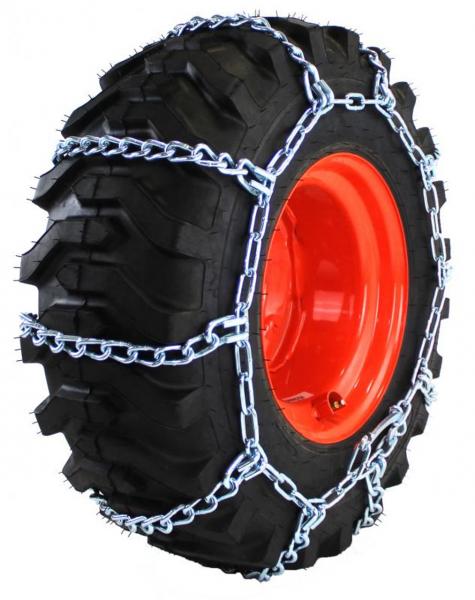
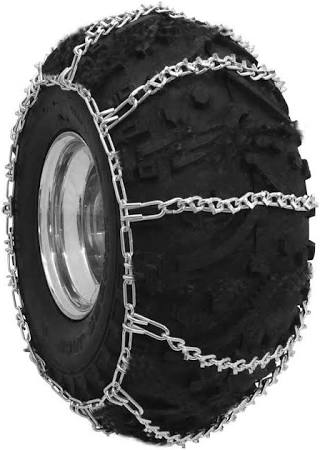
Here are some top picks and why you might choose them:- Bobcat V‑Bar Heavy Duty 4‑Link: V‑Bar design gives excellent grip on snow and ice; “4-link” means more cross bars for traction.
- Bobcat Square‑Link Ladder 4‑Link: Ladder-style chain is very durable and stable — a solid workhorse.
- Bobcat Twist‑Link 2‑Link: Twist-link gives a smoother ride, especially useful if you're driving frequently.
- Bobcat V‑Bar Heavy Duty 2‑Link: Combines V‑Bar traction with lighter chain load.
- Quality Chain Round Twist 2‑Link: Designed for longevity and comfort; made of hardened steel.
- Pewag 4‑Link 8.2 mm: Heavy-duty, high-strength chain from a trusted brand.
- Quality Chain Square Ladder 2‑Link Alloy: Alloy links make this chain lighter but still durable.
- All States Skid‑Steer 4‑Link Ladder: Budget-friendly option that doesn’t compromise too much on quality.
Installation & Maintenance Tips- Once chains are fitted, double-check tightness and alignment. If your chains are too loose, they can damage tires or the machine.
- Use tensioners (bungee or steel) to maintain proper chain tension, especially after the first few uses.
- Regularly inspect the chains for wear, broken links, or stretched sections — replace or adjust as needed.
- Store chains properly when not in use to prevent rust and deformities.
Conclusion
Tire chains are a practical upgrade for the Bobcat 580K, especially in slippery or muddy conditions. Based on user advice and available options, match your chains to your tire size, use quality tensioners, and choose a pattern that fits your terrain. With the right setup, chains can significantly improve stability and traction — just make sure to measure carefully, install them tightly, and maintain them regularly.
|
|
|
|
| Grove RT-60S Outrigger Failure Often Caused by Solenoid Coil or Electrical Connection Issues |
|
Posted by: MikePhua - 11-17-2025, 06:43 PM - Forum: Troubleshooting & Diagnosing
- No Replies
|
|
Grove RT-60S Crane Overview
The Grove RT-60S is a rough terrain hydraulic crane designed for heavy lifting in construction, industrial, and utility applications. Manufactured by Grove, a brand under Manitowoc Company, the RT-60S features a four-wheel drive chassis, telescoping boom, and hydraulic outriggers for stability during lifts. Grove has been producing mobile cranes since the 1940s, and the RT series is known for its durability and off-road capability. The RT-60S, with a lifting capacity of approximately 60 tons, is commonly deployed in remote or uneven terrain where conventional truck cranes cannot operate.
Outrigger System and Common Failure Points
Outriggers are hydraulic stabilizers that extend and lower to provide a wide base of support during crane operation. Each outrigger leg is controlled by a solenoid valve that directs hydraulic fluid to extend or retract the cylinder. When one outrigger fails to deploy, the issue is typically electrical or hydraulic in nature.
In the case of the RT-60S, a rear outrigger that refuses to go down—while still moving laterally—suggests that the extend function is not receiving hydraulic pressure. This is often due to: - Faulty solenoid coil: The coil may lose continuity due to internal wire breakage or corrosion.
- Broken spade terminal: The electrical connection at the solenoid may be physically damaged or disconnected.
- Failed relay or fuse: The control circuit may be interrupted upstream.
- Wiring harness corrosion: Especially common in older units exposed to moisture or road salt.
- Valve spool obstruction: Debris or wear may prevent the spool from shifting to the extend position.
Diagnostic Procedure and Repair Strategy
To diagnose the issue:- Turn the key to the “on” position with the engine off.
- Have a second person activate the outrigger control while using a voltmeter or test light at the solenoid terminals.
- If no voltage is present, trace the wire back to the relay or cab switch.
- If voltage is present but the solenoid does not actuate, remove the coil and inspect for continuity.
- If the coil is damaged, replace it with a compatible unit—often manufactured by Parker, not proprietary to Grove.
One technician discovered that the ground spade had broken off inside the molded plastic of the coil. By carefully cutting away the plastic and splicing a new terminal, he restored function without replacing the entire valve assembly.
Additional Field Tips and Preventive Measures- Always carry spare solenoid coils and spade terminals on long jobs.
- Use dielectric grease on all electrical connections to prevent corrosion.
- Label wires during disassembly to avoid confusion during reinstallation.
- If bolts shear off during coil removal, weld nuts onto the remnants and back them out slowly after cooling.
- Check for manual override plungers on the solenoid body—these can be used to extend the outrigger in emergencies.
Steering System Observations
Some operators report asymmetrical steering performance, such as strong left turns but weak right turns. This may be due to:- Uneven hydraulic pressure from the steering pump
- Internal leakage in the steering cylinder
- Contamination in the steering valve spool
The rear steering system typically runs on the general hydraulic circuit, not a dedicated pump. Cleaning the valve and checking for pressure balance can resolve directional bias.
Conclusion
Outrigger failure on the Grove RT-60S is often a result of solenoid coil damage or electrical connection issues. With methodical diagnostics and basic tools, the problem can be resolved quickly and affordably. Understanding the crane’s hydraulic and electrical architecture is essential for field repairs, especially when working under time constraints. The RT-60S remains a reliable lifting platform, and with proper maintenance, it continues to perform in demanding environments.
|
|
|
|
| Mahindra 4110 Tractor Fails to Move Forward or Reverse: Troubleshooting & Insights |
|
Posted by: MikePhua - 11-17-2025, 06:43 PM - Forum: Troubleshooting & Diagnosing
- No Replies
|
|
Machine Overview
The Mahindra 4110 Compact Utility Tractor is part of Mahindra’s 10 Series utility tractors, produced primarily between 2002 and 2009. It’s a 4WD tractor powered by a Daedong 4A200 4‑cylinder diesel engine putting out about 41 hp (30.5 kW). It uses a 12 forward / 12 reverse synchro‑shuttle transmission with a dry-disc clutch. The hydraulics are open‑center, with a lift capacity around 1,300 kg at the 3-point hitch.
Reported Problem
Some owners experience a frustrating issue: despite selecting forward or reverse on the shuttle lever, the tractor refuses to move. This isn’t a simple lack of clutch engagement — the direction isn't shifting correctly, or the transmission seems unresponsive.
Possible Causes and Diagnoses
- Shuttle Lever / Linkage Misalignment
- The shuttle‑shift lever may not be correctly aligned or properly indexed to the transmission’s internal shift forks.
- A misadjusted or worn linkage can prevent the transmission from picking the correct gear range.
- Synchro‑Shuttle Transmission Wear
- The synchro-shuttle transmission relies on synchronizer rings to change direction. If these are worn or damaged, shifting forward/reverse may not engage properly.
- Clutch issues: though the clutch is a dry disc type, wear or improper adjustment may prevent full disengagement, making shift difficult or impossible.
- Hydraulic or PTO Interferences
- If the PTO is engaged, or if there’s a hydraulic lock via an attachment, the transmission may resist shifting direction.
- Internal pressure from attachments could interfere with the clutch or shift engagement logic.
- Operator Error or Misuse
- The shuttle lever may need to pass through a neutral “window” or be in a specific position when changing direction.
- Some users misunderstand how the shuttle works, especially if used to hydrostatic or gear-only transmissions.
Troubleshooting Steps- Confirm that the clutch is being fully depressed or disengaged when shifting.
- Lift or jack the tractor slightly (safely) and observe whether the transmission output shaft (or driven component) rotates when the lever is shifted.
- Remove the center console or covers to inspect the shuttle‑shift linkage for wear, play, or misadjustment.
- Check for synchronizer ring wear by inspecting the transmission internals if accessible — worn rings often cause failed gear engagement.
- Verify PTO and hydraulic system status: disengage PTO, lower any front loader or implement, and test shifting again.
Common Solutions / Repairs- Adjust or Rebuild Linkage: Correct linkage geometry and replace any worn or bent components.
- Replace Synchro Rings: If the rings inside the transmission are worn, replacing them may restore proper shifting.
- Clutch Service: Inspect and, if needed, replace the dry‑disc clutch system to ensure full disengagement.
- Operator Training: Make sure operators understand the correct procedure for using the shuttle lever, especially in neutral range.
Real‑World Example
One user on a farming discussion forum shared they bought a used 4110 with a sticking shuttle lever. After removing the console, they discovered the linkage was misaligned and not properly indexed. Realigning the lever and adjusting it fixed the forward/reverse engagement problem.
Preventive Advice- Periodically inspect the shuttle linkage for wear or play, especially if the tractor is frequently doing forward-reverse work (e.g., loader work).
- During regular maintenance, check clutch pedal travel and free play; adjust as needed.
- Train operators on correct shifting technique, emphasizing the importance of neutral and smooth direction changes.
Summary
When a Mahindra 4110 refuses to go forward or reverse, the issue most likely lies in the shuttle‑shift mechanism: misaligned linkage, worn synchronizers, or clutch problems. A systematic inspection and proper adjustment can often restore full directional functionality without needing major transmission replacement.
|
|
|
|
|



